Switching from MEE6 to YAWBDB (2026)
Updated by Maxime_48 · 1 week ago · Views: 366
You can move your members' XP across and keep everyone's level. YAWBDB imports a MEE6 leaderboard directly from MEE6's public API — no export file, no manual work, no resetting your community to level 0. The import previews what it found before writing anything, and it can adopt MEE6's level curve so nobody's number changes.
This guide covers what actually differs between the two bots, how to migrate without losing anything, and what to check afterwards.
Do I lose my members' levels?
No. The import brings over every member's total XP exactly as MEE6 stored it. The only thing that can change is the level that XP maps to — because the two bots don't use the same formula — and the import gives you a choice about that before it writes a single row.
The detail is worth understanding, because it is the one thing people get wrong when they switch bots:
- MEE6 charges
5·l² + 50·l + 100XP to leave levell. - YAWBDB's default formula has the same shape, but is indexed on the level being reached rather than the level being left.
The consequence is exact and predictable: importing MEE6 XP onto YAWBDB's default formula makes every member drop precisely one level. Their XP is intact and correct — a level 20 member simply displays as 19.
So the preview measures it on your real data and tells you plainly, for example "412 of the 900 members we could compare would change level here." You then pick:
- Keep YAWBDB's curve — XP is identical, levels shift down by one.
- Use MEE6's curve — YAWBDB switches to the custom preset
a = 5, b = 40, c = 55, which reproduces MEE6's curve to the XP. Everyone keeps the level they had.
That second option is not an approximation. 5(l−1)² + 50(l−1) + 100 expands to 5l² + 40l + 55, so the totals match at every single level.
How to migrate
- Add YAWBDB to your server — see Add YAWBDB to your Discord server.
- Enable Leveling and set your XP rates, cooldown and level-up channel first. The import reads your formula, so configure it before importing rather than after.
- Make your MEE6 leaderboard public. In the MEE6 dashboard, turn on "Make my server's leaderboard public". MEE6 will not release the data otherwise, and the import will tell you so rather than half-finishing.
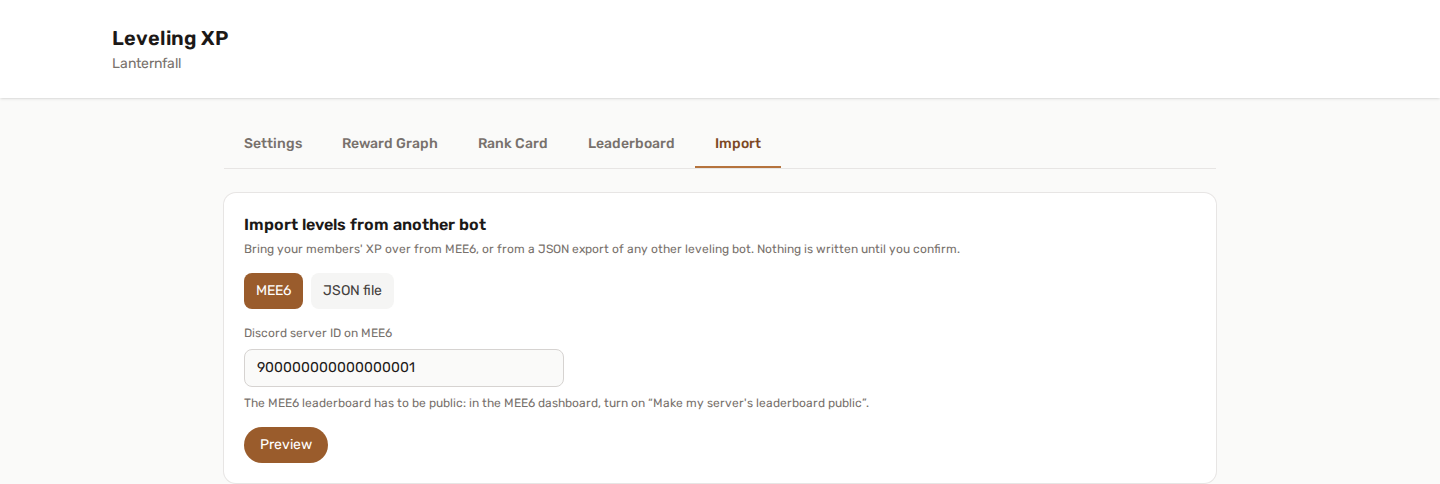
- Open Levels → Import, choose MEE6, and hit Preview.
- Read the curve comparison and decide whether to adopt MEE6's curve.
- Import. Large leaderboards run in the background; you can close the page.
Full reference: Importing levels from another bot.
Coming from a bot that isn't MEE6? The same screen accepts a JSON export from any leveling bot. That is the route for Amari in particular, whose public API was shut down.
What an import deliberately does not do
An import is a data migration, not a live event:
- No level-up messages are sent, however many levels a member gains.
- No reward is fired retroactively — your reward graph is not replayed over imported history.
- Role rewards you import apply from the next level a member reaches, not backwards.
This is on purpose. Announcing thousands of level-ups at once would flood the server, and back-filling roles across an entire leaderboard is rarely what anyone actually wants.
Bringing your role rewards too
If your MEE6 server hands out roles at certain levels, the import can carry those across in the same pass. Each one becomes a "level reached → assign role" pair in the Reward Graph.
The graph is where YAWBDB's leveling goes further than a level-to-role table: it chains triggers, conditions and actions, so "assign a role at level 10" is just the simplest thing it can express. You can also send a DM at level 50, grant a title at prestige, boost XP during a timed event, or gate a reward behind a streak.
Existing paths are checked first, so re-running an import never stacks duplicate branches on your canvas.
What is different, honestly
MEE6 is a mature, well-known bot and it does leveling well — that is exactly why the import exists. The differences worth knowing before you switch:
Configuration lives in one panel. Every feature is configured from the web dashboard rather than through slash commands. See Use the web dashboard.
The feature set is broader. Beyond leveling: moderation, automod, anti-raid, anti-nuke, honeypot, tickets, reports, AI responses, temporary voice channels, custom commands, an embed builder, a form builder, reaction roles, suggestions, join verification, scheduled messages, social alerts, starboard, birthdays, giveaways, server logs, audit log, counters, statroles, games, anonymous voting and analytics. The complete list is on the home page.
Features are connected rather than parallel. Leveling reward-graph triggers fire on giveaway wins, approved suggestions, solved Wordles and members' birthdays. Sanctioned members can be excluded from draws. Engagement events flow into Server Logs. Whenever one feature unlocks options in another, the panel shows what is available — locked options are marked, never hidden.
The panel is available in 14 languages.
What YAWBDB does not try to be: a music bot, or a server-generation AI. If those are what you need, keep the bot that provides them — nothing stops you running both.
After the import: what to check
- Levels → Leaderboard — confirm the totals look like the ones you left behind.
- Run
/rankon a member you know, and compare with what MEE6 showed. - Check the Reward Graph if you imported role rewards, and adjust the levels if your new curve moved them.
- Remove MEE6's leveling (or the bot) once you are satisfied, so two bots aren't both awarding XP and posting level-ups.
Leave both bots running for a day if you want a safety net. Nothing about the import depends on MEE6 staying installed once the data is across — the import reads the leaderboard once and is done.
Can I import from a different server?
Yes. The import takes any Discord server ID, not just the one you are configuring, so you can consolidate two communities into one leaderboard. The same "keep the higher XP / replace / leave alone" choice applies to members who already have XP on the destination server.