Custom AI Model Endpoints
Updated by Maxime_48 · 1 week ago · Views: 396
YAWBDB supports custom OpenAI-compatible endpoints for AI-powered features.
This lets you use your own model provider instead of relying only on the default OpenAI API.
🗺️ Supported feature areas
Custom endpoints can be used for features such as:
- AI Response
- AI Response spontaneous messages (optionally their own endpoint)
- Voice Conversation (speech endpoint)
- AudioToText transcription
- Audio Recording transcription
- Audio Recording AI summaries
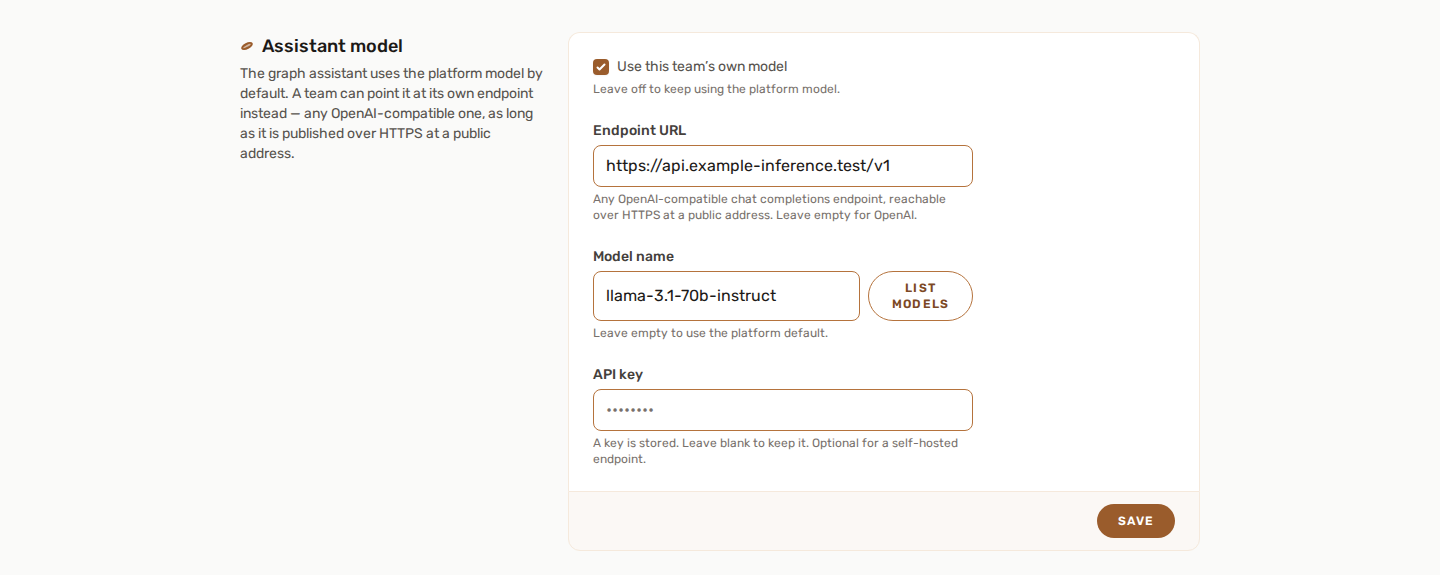
- Graph Assistant (set per team, in the team settings, see Graph Assistant)
Each feature may have its own custom endpoint settings.
🔗 Compatible providers
Any OpenAI-compatible endpoint may work, depending on the provider and model.
Examples include:
- Ollama
- LM Studio
- OpenRouter
- Self-hosted OpenAI-compatible services
- Other compatible APIs
Always check that your provider supports the endpoint type you want to use.
📋 Picking the model
Every model field in the feature settings comes with a List models button.
It asks the endpoint that field is pointed at what it serves, and offers the answer as suggestions:
- if the field's custom endpoint is enabled and its URL is filled in, the list comes from your endpoint, using your own key for it;
- otherwise it comes from OpenAI, using the feature's API key.
The suggestions are filtered to what the field can actually use. A transcription field will not offer chat models, and a chat field will not offer embedding, moderation, image or speech models - those would be accepted at save time and fail at the first message instead.
The field stays free text on purpose. Publishing a model list is optional in the OpenAI format, so some self-hosted servers do not answer it at all, and a self-hosted model is called whatever its owner called it. If the list cannot be fetched, the reason is shown under the field and you can simply type the name.
🔌 Text model endpoint
For AI text responses, you can configure:
- Enable custom text model
- Custom base URL
- Custom API key, if required
- Model name, if available in the feature settings
Example base URL format:
http://localhost:11434/v1
The exact URL depends on your provider.
The models that tidy the memory in the background and match facts by meaning (see AI Memory) are picked from the AI Response endpoint and key.
🔌 Transcription endpoint
For audio transcription, you can configure a custom Whisper-compatible endpoint.
This is used by features such as AudioToText and Audio Recording when transcription is enabled.
🔌 Summary model endpoint
Audio Recording can use a separate custom endpoint for AI-generated meeting summaries.
This lets you use one model for transcription and another model for summaries.
🔌 Speech endpoint (Voice Conversation)
Voice Conversation listens and speaks through its own endpoint, separate from the one that writes the reply. By default it uses api.openai.com with the OpenAI key set in the feature. Turn on Use your own speech endpoint to point it at an OpenAI-compatible server of yours instead: set its Speech endpoint base URL and, if it needs one, its key. That server must offer both /audio/transcriptions and /audio/speech.
If it names its voices differently from the list in the feature, write the right name in Voice name on that endpoint.
🌐 Web search, answer length and cost
- Web search (AI Response, off by default) goes through your text endpoint and key where the provider can browse: OpenRouter with any model, or an OpenAI search model. A self-hosted endpoint cannot browse, so it searches only through a search service you connect in its own dialog: Brave, Tavily or a SearXNG instance.
- Answer length. Every answer is capped at 4000 tokens, self-hosted endpoints included.
- Cost. The AI Response page keeps a daily tally of calls, tokens and an estimated cost per day and per model. The prices come from OpenRouter's public list (OpenAI models included); a model on a self-hosted endpoint reads "unknown".
👁️ Hidden fields
Custom endpoint fields are hidden by default.
They appear only when the relevant custom endpoint toggle is enabled. This keeps the configuration page cleaner for users who do not need custom providers.
🔐 Security notes
- Do not share API keys with untrusted users.
- Make sure your endpoint is reachable from the environment where YAWBDB runs.
- Use HTTPS for remote endpoints when possible.
- Understand how your provider stores or processes data.
- Test with a small prompt or short audio file first.
🔧 Troubleshooting
🚨 The AI does not respond
Check the base URL, API key, and model name. Also confirm that the endpoint is reachable.
🚨 Transcription fails
Make sure the endpoint is Whisper-compatible and supports the audio file format being sent.
🚨 Summaries fail but transcription works
Check the separate summary model endpoint settings.
🏠 Localhost does not work
localhost` may refer to the container or server itself, use an address reachable from the running service.