AI Responses
Updated by Maxime_48 · 1 week ago · Views: 460
AI Responses let YAWBDB reply intelligently in your Discord server.
The feature is designed to make bot replies more natural, more contextual, and less spammy than simple autoresponders.
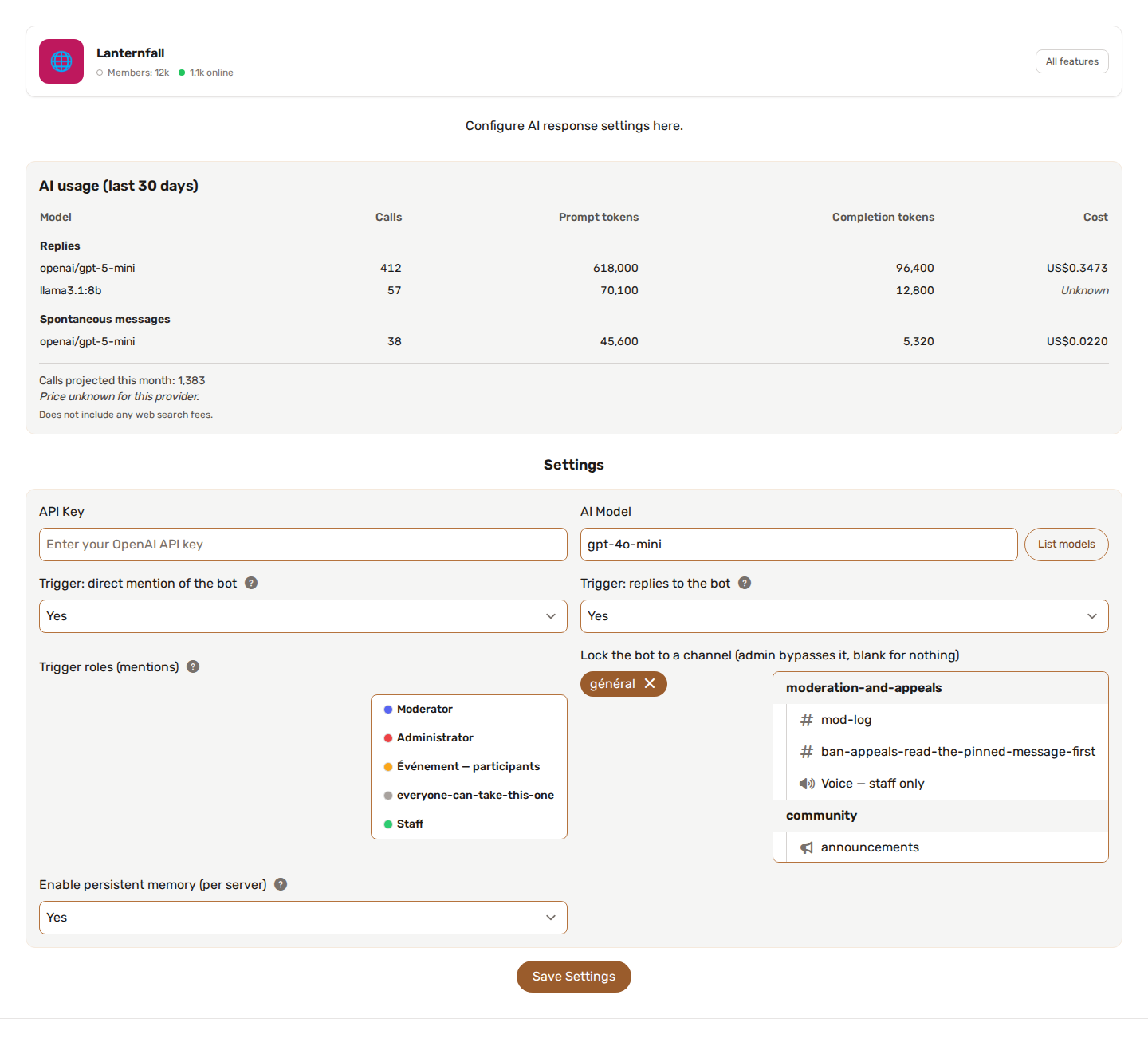
The settings are grouped in folding cards (essentials, who it answers and where, behaviour, spontaneous messages, web search, memory, advanced). Only the first card is open; each card says how many settings it holds, and the row of links above them jumps to the others.
🧠 What the AI can understand
When configured, the AI can use recent conversation context to understand:
- Who said what
- When messages were sent
- Which user is speaking
- Discord username
- Server nickname, when available
- Server roles, when available
- Who is replying to whom - when a member uses Discord's reply feature, the AI sees which message they are answering, including a short quote when the original message is older than the recent history
This helps the AI produce replies that fit the conversation instead of responding blindly to one isolated message.
👁️ Looking at pictures
AI Response can look at the pictures posted in the conversation. It is a setting called "Let the AI look at the pictures in the conversation", off by default.
When it is on, the pictures of the conversation (attachments and image embeds) are sent to the model along with the messages: up to 4 recent pictures, each 5 MB at most, in PNG, JPEG, WebP or GIF.
The setting only works with a model that can read images. The provider's own model list decides when it says so; otherwise the model name does, and a model that is not known counts as unable. When the model you chose cannot see, the panel greys the setting out and tells you why, so you can pick another model (a GPT-4o, Claude or Gemini model, or a LLaVA model on your own server) and come back.
Every picture is billed by your provider, on your own key. Keep that in mind on a busy channel.
A GIF or a video is seen as up to three still frames (start, middle and end), shrunk, so the model follows the movement. This covers attached GIFs, MP4, WebM and MOV files, and GIF links from Klipy (Discord's GIF provider), Tenor and Giphy. A clip counts as one of the 4 pictures, and costs about as much as three small ones whatever its length.
🤫 The AI can choose not to reply
The AI is allowed to stay silent when a message genuinely calls for no response - for example a private exchange between two members, or a message where a simple emoji reaction fits better than a sentence.
This applies both when it is addressed directly and when it speaks up on its own through spontaneous messages (see below).
↩️ It won't talk to itself
When the AI answers, it can attach its reply to a specific message using Discord's reply feature. By default the bot never attaches its reply to one of its own messages - so it doesn't look like it is talking to itself.
If you actually want that behaviour, AI Response has an "Allow the bot to reply to its own messages" option in its settings, shared by regular replies and spontaneous messages alike. It is off by default; turn it on to let the bot self-reply.
🤖 AI Responder
AI Responder is used when you want the bot to respond to specific triggers, mentions, or conditions.
Common use cases:
- Answering user questions
- Roleplay or lore-aware responses
- Server assistant behavior
- Support-style replies
- Context-aware bot personality
🎲 Spontaneous messages
Spontaneous messages let the bot join a conversation on its own, without being called. This used to be a separate feature, Random Bot Interactions; it is now a section of AI Response's own settings, one feature with one set of settings. A server that had both configured keeps everything it had - where the two used to disagree on endpoint, key or model, the spontaneous side keeps its own.
The goal is not to reply to every message. Set:
- Channels where the bot is allowed to speak on its own.
- Cadence - how many messages from others must pass, and how long to wait, before it may chime in.
- Optionally, its own model and endpoint, separate from the ones used for regular replies.
A reply resets the cadence, so a spontaneous message never lands right after the bot has just answered someone.
This keeps the feature fun without turning it into spam.
🧵 Threads
A thread opened inside a channel is a channel of its own for Discord, with an id that no setting ever listed. By default the bot therefore leaves threads out: it does not answer, remember, react or speak on its own inside a thread, even when the channel the thread was started in is allowed. If someone calls it there, it says that threads are not included and points to the allowed channels, instead of naming the thread itself.
AI Response has an Include threads option in its settings, off by default. Turn it on and a thread follows the channel it was started in, for all of these settings:
- the channel lock (Lock the bot to a channel)
- the Memory read channels and Memory write channels
- the Reactions allowed channels
- the channels where it may speak on its own
A thread of a channel that is not allowed stays not allowed. Memory is the reason it ships off: a thread can be open to people who cannot see the channel it came from, so memory read from that channel would reach them. Switch it on only if that is what you want.
🌐 Web search
AI Response can search the web before answering. Off by default.
Where your provider supports it natively - OpenRouter with any model, or an OpenAI search model - the search goes through your own endpoint and key, no extra setup needed. Otherwise, you can connect a search service of your own in its own dialog: Brave, Tavily, or a SearXNG instance you run.
What comes back is capped in length and is never written to memory. A search that fails does not post a placeholder message and does not cost a second call.
The model is told today's date. When a question is about what is latest or current ("latest", "today", "this month", "news"), the search asks for the most recent results first, shows each result's date, and tries again without the time filter if nothing comes back.
💰 What your model usage costs
The AI Response page keeps a daily tally: calls, tokens, and an estimated cost per day and per model. Prices are fetched from OpenRouter's public list, OpenAI models included; a self-hosted model reads "unknown" - no price is ever invented for it.
Every answer is capped at 4000 tokens, self-hosted endpoints included.
👍 Reactions
The AI can react with emojis when appropriate.
Reactions are limited and should not happen on every message.
The bot can also react to a specific message in the same channel when requested and supported by the context.
🧼 Cleaner output
AI messages are processed so the bot does not dump raw structured data or JSON into the chat. Internal context annotations the AI is shown (such as reply markers) are also stripped, so they never leak into a message.
The goal is to keep Discord messages clean and natural.
🧠 Memory support
AI Responses can use YAWBDB's memory system to remember useful server context.
For example, it can remember recurring facts, server lore, preferences, or information that helps future responses.
Memory can be managed from the panel.
🔌 Custom model endpoints
AI-powered text features can use custom OpenAI-compatible endpoints.
This means you can connect providers such as:
- OpenAI-compatible APIs
- Ollama
- LM Studio
- OpenRouter
- Other compatible model servers
See Custom AI Model Endpoints for more details.
💡 Best practices
- Start with a clear bot personality or instruction.
- Keep random interactions conservative at first.
- Review memory entries regularly.
- Use custom endpoints only if you understand how your provider handles requests.
- Avoid letting the AI act as a moderator unless you have strong rules and human review.