Audio Recording
Updated by Maxime_48 · 1 week ago · Views: 322
Audio Recording lets YAWBDB record Discord voice channel conversations and optionally generate transcriptions and AI summaries.
It is useful for meetings, podcasts, gaming sessions, interviews, study groups, community events, and any voice conversation you want to keep or review later.
WARNING : Feature has a limited roll-out due to being unstable, contact us to have your server whitelisted.
⭐ Key features
Audio Recording can provide:
- Voice channel recording
- MP3 output
- Automatic transcription
- AI meeting summaries
- Multi-language summary behavior based on transcript language
- User storage limits
- External upload support
- Automatic recording mode
⌨️ Basic commands
Common commands include:
/record start
/record stop
Use /record start to begin recording and /record stop to end and process the recording.
⌨️ Storage commands
Users can manage their recordings with:
/record-storage status
/record-storage list
/record-storage get
/record-storage clear
These commands help users check usage, list recordings, retrieve recordings, or delete old recordings.
📝 Transcription
When transcription is enabled, YAWBDB converts the recording into text.
This can be useful for:
- Meeting notes
- Accessibility
- Searchable records
- Follow-up summaries
- Action item extraction
🧾 AI summaries
When AI summary is enabled, YAWBDB can generate a summary from the transcript.
A summary may include:
- Key points
- Decisions
- Action items
- Important discussion topics
Summaries are generated in the same language as the transcript when supported.
📋 Where to read the summaries
The summary is not posted in the voice recording's text channel. YAWBDB stores it in the panel, on the server's Meeting summaries screen (button on the server's features page), where only your team members who may moderate the server can read it. The channel only receives a short message with a link to that screen.
Summaries are kept for 90 days, then removed automatically. A team member who may configure the server can delete one earlier.
If the panel cannot be reached when the recording ends, the summary is posted in the channel as before, so it is never lost. The transcript and the audio files are handled as before.
💾 Storage limits
Each user has personal storage limits.
Old recordings may be automatically cleaned up when limits are reached.
External upload providers can be used for larger files or custom storage workflows.
☁️ External upload
Audio Recording can support external upload providers such as S3 or custom upload endpoints.
This is useful when Discord upload limits or local storage limits are not enough.
🤖 Automatic mode
Automatic recording mode can start or stop recordings based on voice channel activity.
This is useful for recurring meetings or channels where recordings should happen without manual commands.
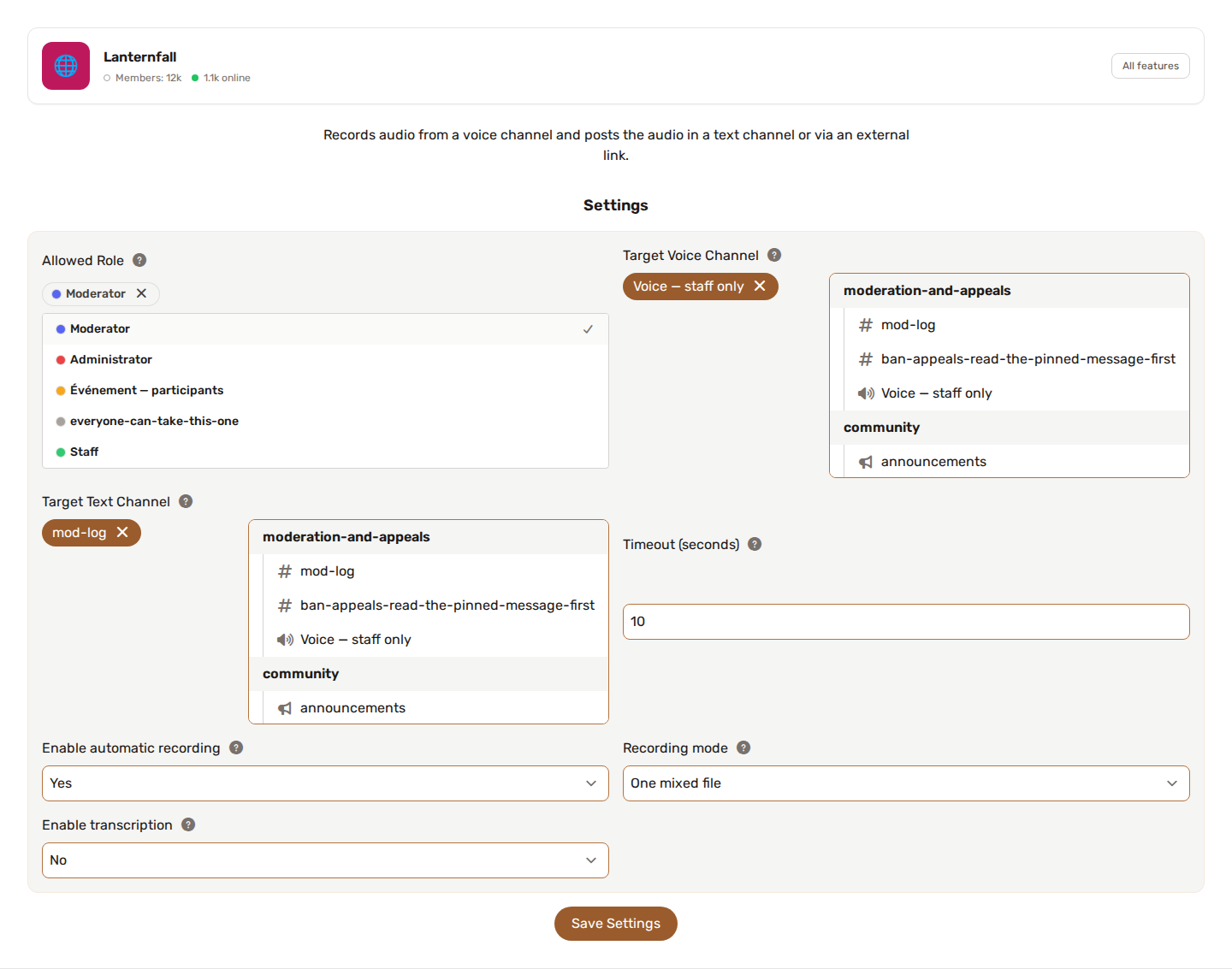
If Voice Conversation is resident on the same server, see Voice Conversation and Audio Recording together: in the same channel the bot does both, in different channels the channel set first keeps the priority. The Target Voice Channel list offers voice and stage channels.
🧪 Configuration examples
You may configure:
- Voice channel
- Text channel for results
- MP3 bitrate
- Maximum file size
- Splitting behavior
- Transcription enabled or disabled
- AI summary enabled or disabled
- Storage retention
- External upload provider
- Automatic recording mode
💡 Best practices
- Always make sure participants know they are being recorded.
- Test recording before important meetings.
- Use external upload for long recordings.
- Keep transcription and summary enabled only when needed.
- Clear old recordings regularly.
- Check your local laws and server rules before recording conversations.