Counters
Updated by Maxime_48 · 1 week ago · 66 views
Counters turn boring voice channels into live server stats. The bot automatically renames a voice channel to show a number that updates on its own — member count, boosts, online members, and more — right at the top of your channel list.
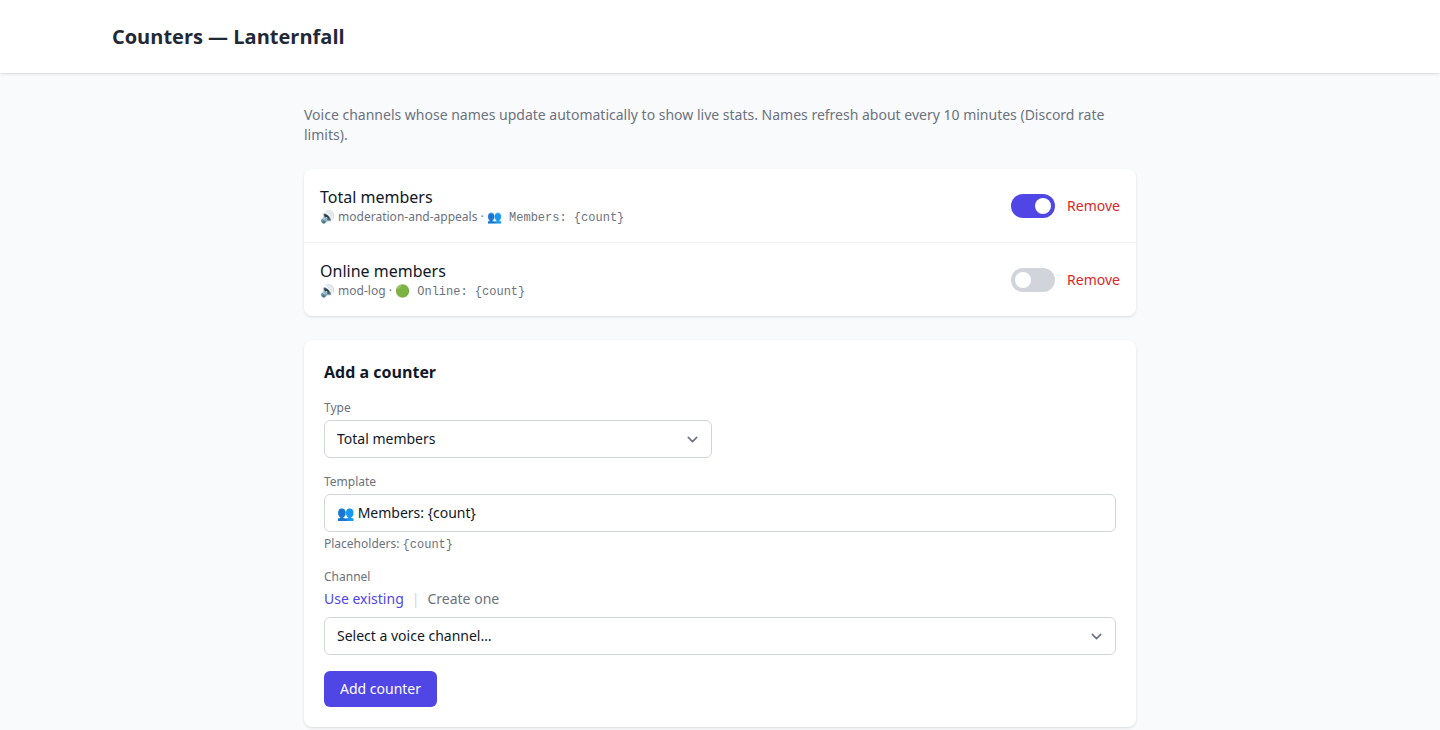
📊 What you can show
Each counter shows one stat:
- Total members, humans, bots
- Online members
- Boosts and boost level
- Members with a specific role
- Text channels, voice channels, categories
- Bans
- Boosters (members boosting the server)
⚙️ Setting one up
From your server → Counters:
- Pick a type from the list above.
- Choose the channel:
- Use an existing voice channel, or
- Create one — the bot makes a locked voice channel that members can't join (it's display-only).
- Set a name template with
{count}for the value — for example👥 Members: {count}or🚀 Boosts: {count}. For the boost level, use{level}(e.g.⭐ Level {level}).
That's it — the bot keeps the channel name up to date.
⏱️ How often it updates
Names refresh about every 10 minutes. This isn't a setting: Discord limits how often a channel can be renamed (twice per 10 minutes), so the bot stays safely within that and only renames when the number actually changes.
💡 Tips
- Counters work best grouped at the top of your channel list in their own category.
- The locked channels created by the bot are perfect for stats — nobody can join them, they just display the number.
- A member-with-role counter is great for showing how many people have a key role (e.g.
🎫 Subscribers: {count}).