Server Logs
Updated by Maxime_48 · 1 week ago · Views: 319
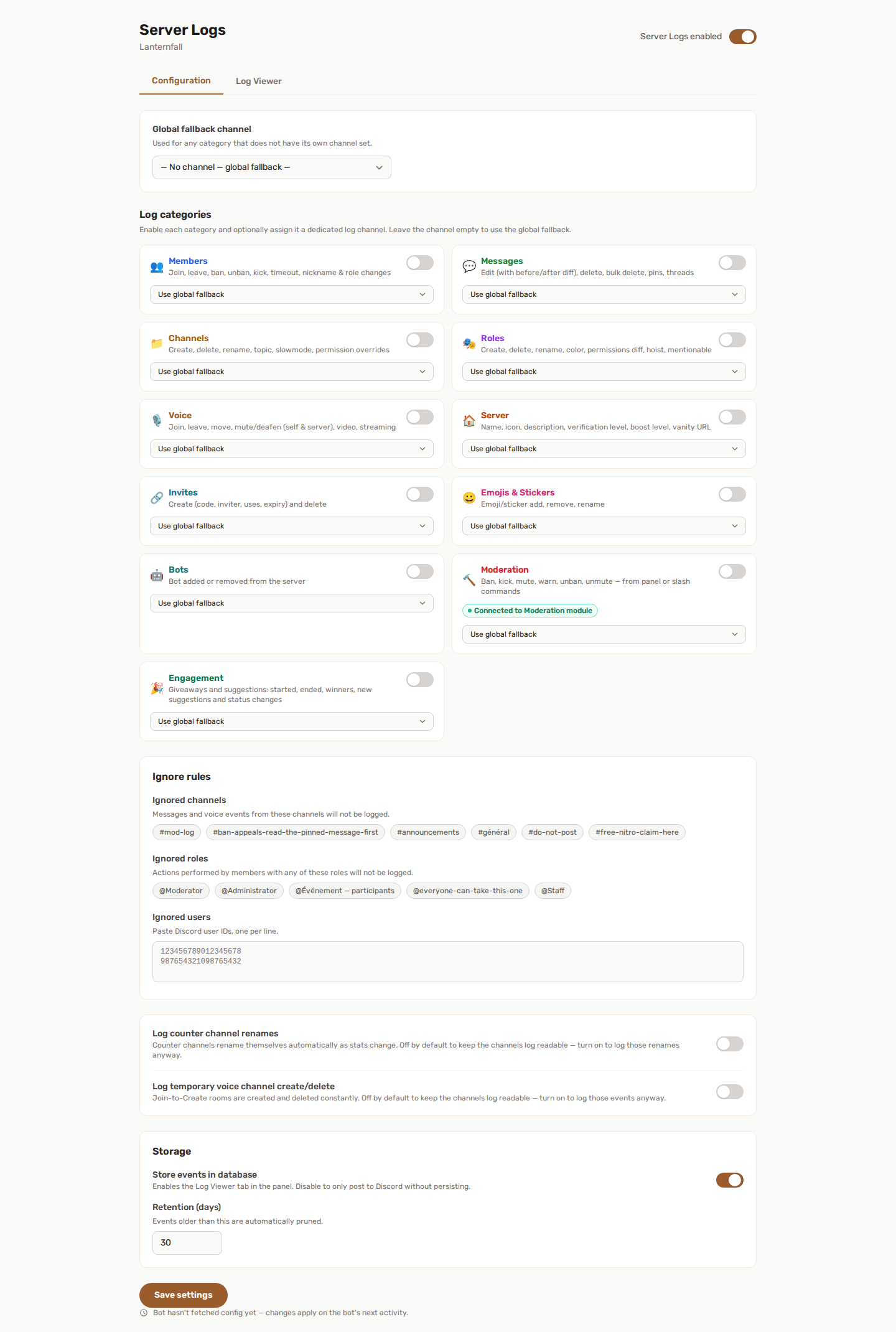
Server Logs tracks everything that happens in your server and records it — both as formatted embeds in Discord and as searchable entries in the panel.
Everything is configured from the panel. There is nothing to set up with slash commands.
📋 What gets logged
Server Logs is split into 11 independent categories. You enable only the ones you want.
| Category | What's tracked |
|---|---|
| 👥 Members | Joins, leaves, bans, unbans, kicks, nickname changes, role changes |
| 💬 Messages | Edits, deletes, bulk deletes, pins |
| 📁 Channels | Create, delete, rename, topic, slowmode, NSFW, category — and permission overwrites, named one transition at a time: granted, denied, no longer granted, no longer denied |
| 🎭 Roles | Create, delete, rename, permission and color changes |
| 🎙️ Voice | Join, leave, move between channels, deafen, mute, stream start/end |
| 🏠 Server | Name, icon, description, verification level, banner, AFK / system / rules / moderator channels — and a change of owner, the content filter and the 2FA level required to moderate |
| 🔗 Invites | Create and delete, with full invite metadata |
| 😀 Emojis & stickers | Create, delete, rename (emojis); add, remove, rename or re-describe (stickers) |
| 🤖 Bots | Bot added to or removed from the server |
| 🔨 Moderation | Ban, kick, warn, mute, softban, unban, unmute |
| 🎉 Engagement | Giveaways (started, ended, winners), suggestions (new, status changes), game results, birthdays (registered, announced) and form submissions. What each game sends is chosen per game, see Games |
Why the four permission transitions are named separately. No longer allowed hands the decision back to the member's roles; denied takes it away from them. They are not the same event, and a log that merges them cannot tell you which one happened.
The two settings someone weakens first are the content filter and the 2FA level required to moderate. Both are now named in full — a line reads "Elevated → None", not "1 → 0" — and a channel setting shows the channel's name rather than its id.
📡 Log channels
Each category can be enabled independently and assigned its own dedicated log channel.
You can also set a single global log channel as a catch-all fallback. If a category has no channel of its own, its events go to the global channel.
Example: send moderation events to a private
#mod-logand everything else to a general#server-log.
🙈 Ignore rules
To reduce noise, you can exclude events from logging:
- Channels — events in ignored channels are never logged (useful for bot spam or private staff channels).
- Roles — members holding any ignored role are excluded from logging.
- Users — specific Discord user IDs are excluded.
🔇 Quiet by default
Two kinds of channel changes happen all the time by themselves, so they are not logged unless you ask (under More settings):
- Log counter channel renames - the automatic renames of Counters channels.
- Log temporary voice channel create/delete - the rooms created and removed by Temporary Voice.
Both are off by default to keep the channels log readable.
🔎 Log viewer
Stored events can be browsed directly in the panel from the Log Viewer tab.
You can filter by:
- Category (members, messages, roles, etc.)
- Keyword (across event type, actor, and target)
- Actor ID / Target ID
- Date range (from / to)
Results are paginated, and you can export the current filtered view as a JSON file. The export covers the category selected in the filter, up to the 5,000 most recent events; the other filters are not applied to it.
Storage is enabled by default. Retention is 30 days by default and can be configured up to 365 days.
The Server Logs enabled switch turns the whole feature on or off. Store events in database is what powers the Log Viewer tab: switch it off and events are only posted to Discord.
🔗 Server Logs and Moderation
When the Moderation feature is active, moderation actions (bans, kicks, warns, mutes, and their reversal) flow automatically into the Moderation log category — no extra setup needed.
The moderation category card shows a status badge:
- Connected to Moderation module — the Moderation feature is enabled and actions are auto-synced.
- Moderation module not enabled — the moderation category only logs what Discord's audit log reports.
🔗 Server Logs and other features
Other features that take moderation actions also feed the Moderation category, so everything lands in one place:
- Automod and Anti-Raid actions.
- Honeypot triggers. When Server Logs has a Moderation channel configured, the Honeypot's own log channel is bypassed to avoid duplicate entries.
👍 Recommended setup
- Set a global log channel as a fallback.
- Enable the categories you care about and give the sensitive ones (moderation, members) their own private channels.
- Add ignored channels for bot spam or noisy integrations.
- Keep storage on so you can search history later.
💡 Best practices
- Send moderation logs to a staff-only channel.
- Avoid logging every category at once on very large servers — pick what you actually review.
- Use the Viewer's export to keep records beyond the retention window.
- Combine with the Moderation feature so manual and automatic actions are all captured.