Team roles and permissions
Updated by Maxime_48 · 4 weeks ago · Views: 385
YAWBDB uses permissions to control who can view, configure, or manage each server.
This is important when multiple people help manage the same Discord server.
👥 Server teams
Each connected Discord server belongs to a team in the YAWBDB panel.
Team members can be given different levels of access depending on what they need to do.
A server owner or team administrator can invite users and assign roles.
🔑 The three roles every team starts with
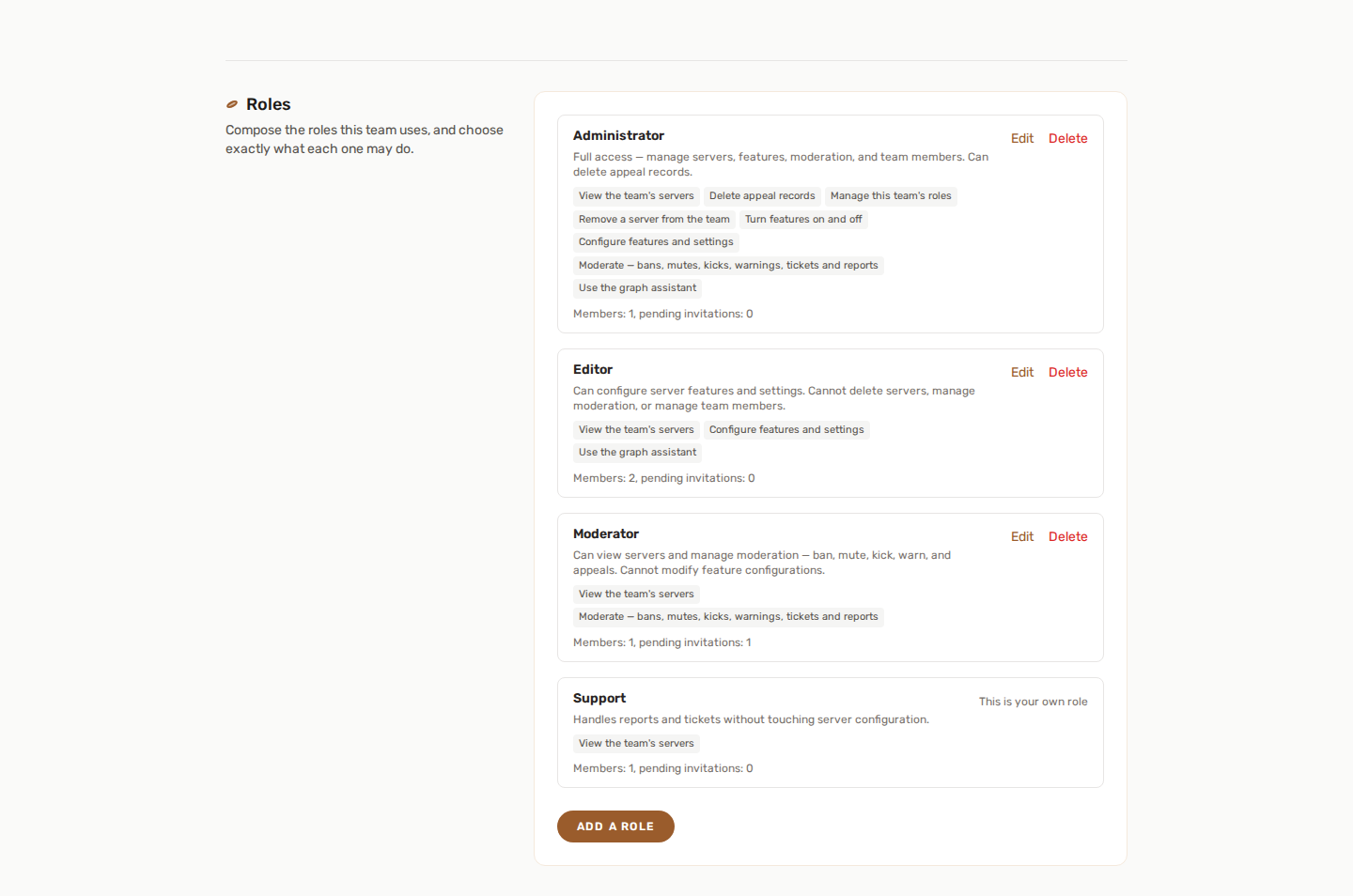
A new team is created with three roles. They are a starting point, not a fixed list — you can edit all three, and add your own.
👑 Owner
The owner is not a role you can edit or remove: they always have full control over the team and its servers, including managing members and roles. This is deliberate — a team that emptied its own role list would otherwise have nobody left who could repair it.
🛡️ Administrator
Everything except ownership: view servers, configure features, turn them on and off, moderate, remove a server from the team, use the graph assistant, delete appeal records, and manage the team's roles.
✏️ Editor
Can view servers, configure features and use the graph assistant. Cannot turn features on or off, moderate, remove a server, or manage roles.
🛡️ Moderator
Can view servers and use every moderation page and action — search members, apply sanctions, review reports, handle appeals, manage tickets. Cannot change feature configuration.
🎨 Composing your own roles
Team settings → Roles lets you build the roles your team actually needs instead of bending it around three. Give a role a name and a description, then tick exactly what it may do:
| Permission | What it allows |
|---|---|
| View the team's servers | Open a server's pages at all. Without it, nothing else is reachable. |
| Configure features and settings | Change how a feature behaves. |
| Turn features on and off | Enable or disable a feature entirely. |
| Remove a server from the team | Disconnect a Discord server from YAWBDB. |
| Moderate | Bans, mutes, kicks, warnings, tickets and reports. |
| Delete appeal records | Remove an appeal from the history. |
| Manage this team's roles | Edit the roles themselves — see the limits below. |
| Use the graph assistant | Talk to the AI assistant on the reward graph. |
Editing a role takes effect immediately for everyone holding it. Every change is written to your audit log, with a before and after.
🔒 What role management will not let you do
Managing roles is managing privilege, so a few things are refused rather than merely discouraged:
- You cannot grant a permission you do not hold yourself. When you edit an existing role, this applies only to permissions you are adding — you can always rename a role, or take a permission away.
- You cannot edit the role you currently hold. Upwards that is self-promotion; downwards it would lock you out of the page you are on. Ask another member with the same permission, or the owner.
- You cannot delete a role somebody still holds, including someone with a pending invitation. Move them to another role first.
The owner is exempt from all of it, and always can.
✏️ Renaming and deleting
A role's name and description can be changed at any time. Its internal identity cannot — that is what links your members to it — so renaming "Moderator" to "Support" keeps everyone who held it exactly where they were.
🎭 Platform roles
Some YAWBDB accounts may also have platform-level roles, such as support, moderator, or admin.
These roles are separate from server team roles.
Platform roles are used for YAWBDB-wide tools such as platform support, backoffice moderation, announcements, wiki editing, or administration.
🔑 Discord permissions still matter
Panel permissions do not replace Discord permissions.
For actions that affect your Discord server, the bot itself must also have the required Discord permissions.
For example:
- Banning requires ban permissions.
- Kicking requires kick permissions.
- Muting requires timeout or role-management permissions.
- Creating ticket/report channels requires channel-management permissions.
- Assigning roles requires role-management permissions.
If an action fails, check both the YAWBDB panel permission and the bot's Discord permissions.
💡 Best practices
- Give users only the permissions they need.
- Keep destructive actions limited to trusted staff.
- Use separate staff roles for reports and tickets when possible.
- Review team access regularly.
- Remove old staff members from the team when they no longer need access.
🚫 If you cannot access a page
If a page is missing or returns an error, it may be because:
- You are not a member of the server team.
- Your team role does not include the required permission.
- Your Discord account is not linked.
- The feature is not enabled.
- The page is limited to platform staff.
Ask the server owner or a team admin to review your permissions.