Notifications
Updated by Maxime_48 · 1 week ago · Views: 253
YAWBDB's notification bell collects important updates in one place.
It is designed to show what needs your attention without forcing you to check every page manually.
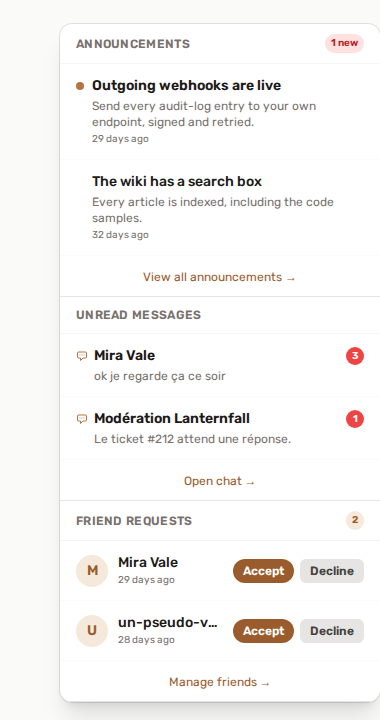
🔔 Notification bell
The bell appears in the top navigation bar.
It can show grouped sections such as:
- Announcements
- Unread messages
- Friend requests
- Moderation alerts
- Reports
- Tickets
- Appeals
- Support items
The exact sections depend on your account, roles, and enabled features.
📢 Announcements
Platform announcements can appear in the bell with an unread indicator.
Click an announcement to open the full post.
Use the View all announcements → link in the bell to open the full list.
The list shows 15 announcements per page, newest first. Expired announcements are hidden by default: a Show expired announcements button, with the number of hidden ones, brings them back (they carry an expired badge), and Hide expired announcements hides them again. The choice is kept when you move to the next page.
🔴 Unread messages
Unread chat conversations can appear in the bell with a preview and unread count.
Clicking the item opens the conversation.
🛡️ Moderation notifications
Moderation-related bell items are role-aware.
Depending on your access, you may see:
- Your open unban appeals (pending or under review)
- Pending unban appeals on servers you moderate
- Pending Discord reports on servers you moderate
- Open Discord tickets on servers you moderate
- Sanctions expiring within 24 hours
- Pending message reports (platform moderators)
- Open support tickets (support staff)
🔊 Sounds
YAWBDB can play distinct sounds for certain real-time notifications.
Sounds only play after you have interacted with the page, because browsers block autoplay before interaction.
📧 Email notifications
YAWBDB can also send email notifications based on your preferences.
Examples:
- Account suspensions or reinstatements
- Support ticket replies
- New chat messages
- Platform announcements
- Appeal updates
- New reports for moderators
- New tickets for support staff
- Friend requests
📧 Email preferences
Open your profile and go to Email Notifications to choose which emails you want.
Some preferences only appear if they are relevant to your account or roles.
💡 Best practices
- Keep important staff notifications enabled.
- Disable noisy notifications you do not need.
- Use the bell for quick triage.
- Check email preferences after joining a new team or taking a staff role.