Importing levels from another bot
Updated by Maxime_48 · 1 week ago · Views: 359
Switching leveling bots normally means telling your community that everyone is back to level 0. You don't have to. Open Levels → Import in the panel and bring your members' XP across — from MEE6 directly, or from a JSON export of any other leveling bot.
Nothing is written until you have seen a preview and confirmed it.
Coming from MEE6 specifically? Switching from MEE6 to YAWBDB walks through the whole move, not just the import screen.
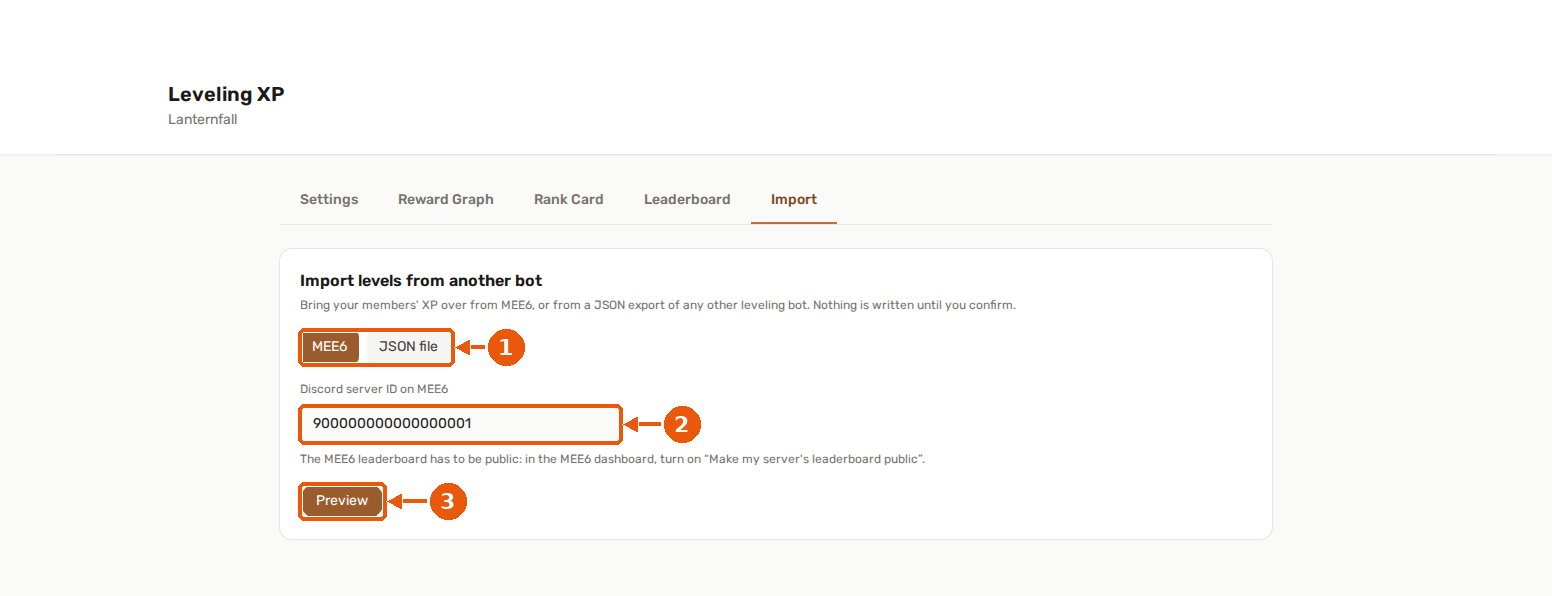
- Choose the source: MEE6 or a JSON file.
- Enter the Discord server ID on MEE6.
- Preview shows what would be imported. Nothing is written until you confirm.
📥 Importing from MEE6
Pick MEE6, enter the Discord server ID (yours is filled in already), and hit Preview.
The MEE6 leaderboard has to be public. In the MEE6 dashboard, turn on "Make my server's leaderboard public". Without it, MEE6 refuses to hand the data over and the import stops with an explanation instead of a silent half-result.
You can import from a different server than the one you're configuring — just paste that server's ID. Useful if you're consolidating two communities.
The preview shows how many members were found, how many of them already have XP here, and a sample of the top of the leaderboard.
📄 Importing from a JSON file
Amari's public API was shut down, and most other leveling bots never had one — so the second route is a file. Pick JSON file and upload an export.
The parser is deliberately forgiving. It accepts:
- a plain JSON array of members,
- an object containing a
playersarray (a raw MEE6 response works as-is), - an object containing a
dataarray (the shape Amari used — XP as a string is fine), - and the usual field aliases:
id/user_id/discord_id, andxp/exp/experience.
Each entry needs only two things to be usable: a Discord user ID and an XP amount. Entries missing either are skipped rather than failing the whole file.
If the file also carries role rewards (role_rewards or rewards), those are picked up too.
The round trip is built in: Levels → Leaderboard's ↓ JSON Export produces a file in exactly this shape,
playersarray included. Export from one server, import into another - or keep it as a backup you can bring straight back in. See Rank Card & Public Leaderboard.
📐 The level curve — the one decision worth reading
Two bots can hold the exact same XP and still show different levels, because the level is just a lookup on a curve, and not every bot uses the same one.
MEE6 charges 5·l² + 50·l + 100 XP to leave level l. YAWBDB's formula has the same shape but is indexed on the level being reached. The practical consequence: importing MEE6 XP onto our default preset makes every member drop exactly one level. Their XP is untouched and correct — it just maps one rung lower.
So the preview measures it on your actual data and tells you plainly, for example: "412 of the 900 members we could compare would change level here — up to 1 level lower."
Then you choose:
- Keep your curve — XP is imported exactly, levels are recomputed under your formula. Members see their number go down by one.
- Use the source's curve — YAWBDB switches this server's formula to the custom preset a = 5, b = 40, c = 55, which reproduces MEE6's curve to the XP. Everyone keeps the level they had.
Adopting the curve is a server-wide setting, so it also recalculates the level of members who were already here before the import. Their XP is never modified — only the level it maps to. That's on purpose: leaving half the leaderboard on the old formula would look like a bug.
If your server already uses a curve identical to MEE6's, the question isn't asked at all.
⚙️ Members who already have XP here
Choose what happens on a collision:
| Option | What it does |
|---|---|
| Keep the higher XP | Imports only when the source has more. The safest option, and the default. |
| Replace with the imported XP | The source wins, even when it's lower. |
| Leave them alone | Only members with no XP here at all are imported. |
Members who are in the import but have never spoken here are never affected by XP decay until they actually become active — an import doesn't start a decay clock.
🎖️ Role rewards
If the source exposes role rewards, you can import them at the same time. Each one is added to your Reward Graph as a "level reached → assign role" pair.
Existing paths are checked first, so re-running an import doesn't stack duplicate branches on your canvas. If your reward graph is at its node limit, the import fills what it can and tells you how many were added out of how many were found.
🔕 What an import does not do
An import is a data migration, not a live event:
- no level-up messages are sent, however many levels a member gains,
- no reward is fired retroactively — the graph is not replayed over imported history,
- role rewards you imported apply from the next level a member reaches.
This is deliberate. Announcing thousands of level-ups at once would flood the server, and back-filling roles for an entire leaderboard is rarely what you actually want.
⏳ While it runs
Large leaderboards are imported in the background. The page shows a progress bar, and you can close it — the import keeps going and the progress is still there when you come back.
The page checks the progress every couple of seconds. A check that fails (a dropped connection, for example) is simply tried again and the progress already shown stays on screen. After five failed checks in a row it stops checking and says the panel could not be reached, while the import itself keeps running; press Check again to resume.
When it finishes you get a breakdown: members added, updated, skipped, and role rewards imported.
Only one import can run at a time per server.
👍 Recommended order
- Configure Leveling first (XP rates, cooldown, level-up channel).
- Run the Preview and read the curve comparison.
- Decide on the curve before importing — changing it afterwards means every member's level moves again.
- Import, then check Levels → Leaderboard.
- Add or adjust rewards in the Reward Graph.