Leveling & XP
Updated by Maxime_48 · 1 week ago · Views: 513
The Leveling system rewards active Discord members with XP, levels, streaks, prestige, roles, and other rewards.
It is designed to be configurable from the YAWBDB panel without requiring command-based setup.
The Leveling switch on the feature page alone decides whether the bot gives XP. When it is off, the bot gives no XP, prestige, titles or multipliers, and the daily decay and Daily Top Member jobs skip the server. When it is on and you have not opened the Levels page yet, the defaults apply.
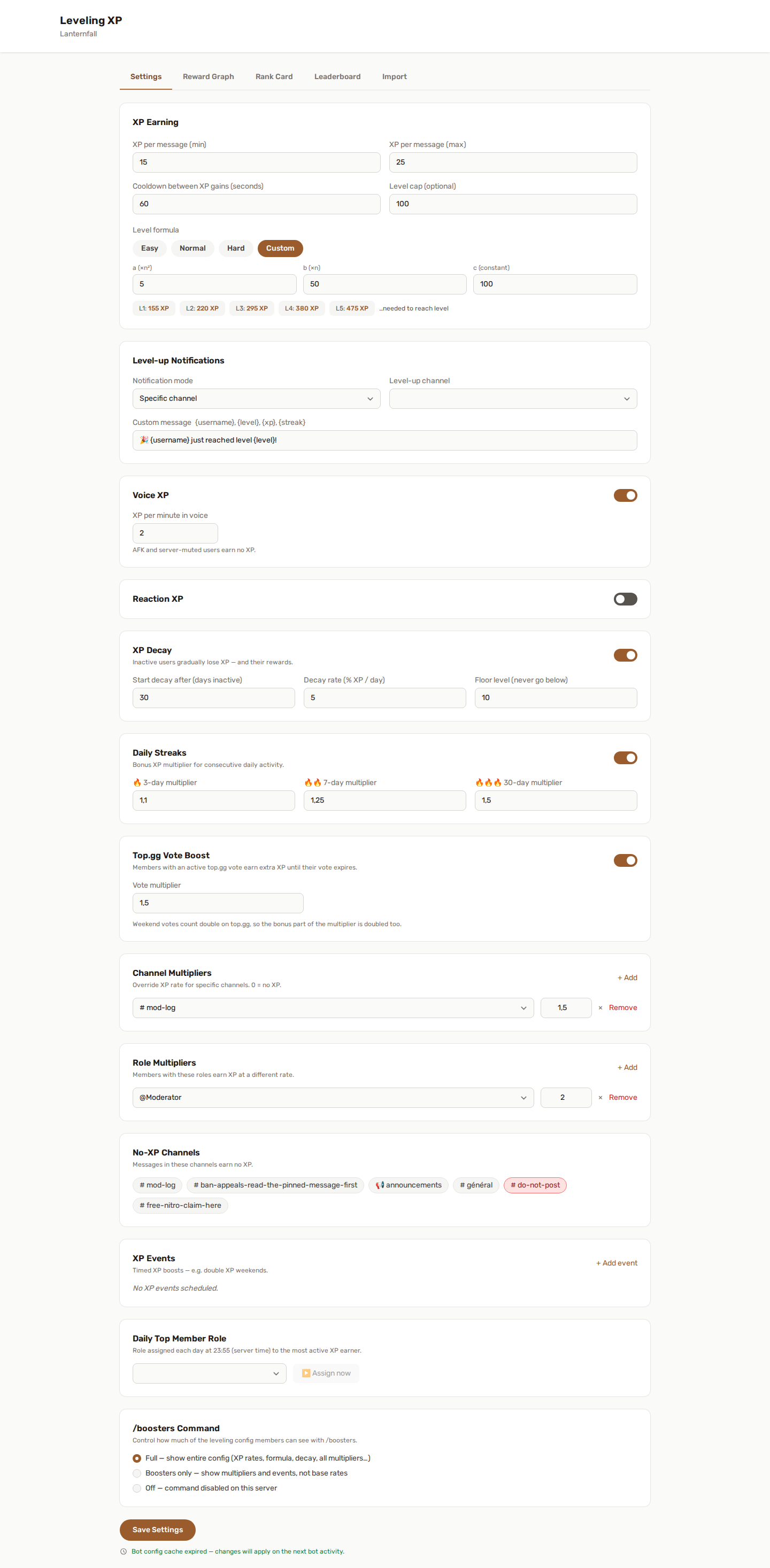
📈 How members earn XP
Members can earn XP from multiple activity sources.
💬 Text messages
Members earn XP by sending messages in your Discord server.
You can configure:
- Minimum XP per message
- Maximum XP per message
- Cooldown per user
- Channels where XP is disabled
- Channel multipliers
- Role multipliers
The cooldown helps prevent spam farming.
🎙️ Voice activity
Members can earn XP while spending time in voice channels.
Voice XP is useful for servers where activity happens mostly in calls, gaming sessions, study rooms, meetings, or community events.
AFK or server-muted users may be excluded from voice XP depending on the configuration.
👍 Reactions
Members can earn XP when other users react to their messages.
This rewards useful, funny, or interesting messages that receive engagement from the community.
🧮 Level formula
YAWBDB supports multiple level progression presets:
- Easy - faster early progression
- Normal - balanced default progression
- Hard - slower and more demanding progression
- Custom - custom formula coefficients
A custom formula lets advanced server owners tune the XP curve to match their community size and activity level.
🎊 Level-up notifications
You can choose how YAWBDB announces level-ups.
Available modes include:
- Disabled
- Current channel
- Direct message
- Specific channel
Level-up messages can be customized with variables such as the username, level, XP, streak, or server name.
🔥 Daily streaks
Daily streaks reward consistent activity.
You can configure XP multipliers for activity streaks such as:
- 3-day streak
- 7-day streak
- 30-day streak
If a member misses a day, their streak resets.
🗳️ Top.gg vote boost
Members who vote for YAWBDB on Top.gg can earn extra XP while their vote is active. A vote lasts twelve hours, so the boost does too, and it ends at the moment they are allowed to vote again.
This is off by default on every server. Turn it on under Leveling → Top.gg Vote Boost, and pick the multiplier you want to give.
Top.gg counts a weekend vote as two. That doubles the bonus, not the multiplier: set to ×1.5, a weekend vote is worth ×2.0 - not ×3.0. A single weekend vote should not be worth more than a thirty-day streak.
Nothing is locked behind voting. No command, no channel, no feature stops working for someone who never votes; the boost is a thank-you, not a toll.
A member can see where they stand with /boosters: the line shows the boost
while it runs, with when it ends, and shows the offer when it does not.
Server owners: this needs the Top.gg webhook set up once, in the panel's admin area. Until it is, the switch on this page has nothing to react to.
🎉 XP Events
XP Events let you schedule temporary or recurring XP boosts.
Examples:
- Double XP Weekend
- Community event bonus
- Voice night multiplier
- Holiday XP event
XP Events can be used with other multipliers and can also trigger Reward Graph actions.
📉 XP Decay
XP Decay can reduce XP for inactive members after a configured number of days.
You can configure:
- When decay starts
- How much XP is removed per day
- A floor level that members cannot drop below
This helps keep leaderboards active and rewards current participation instead of only historical activity.
🥇 Daily Top Member role
YAWBDB can automatically assign a role to the member who earned the most XP during the day.
The role rotates automatically. The previous holder loses the role when a new daily top member is selected.
👑 Prestige
Prestige lets members reset their level after reaching the level cap while keeping a prestige counter.
This gives highly active members a long-term goal beyond the normal level cap.
Prestige can also be used in the Reward Graph to unlock special rewards.
🏆 Leaderboard
The leaderboard shows member progress and rankings.
Depending on the page or command, it can display:
- Rank
- Level
- XP
- Streak
- Prestige
- Title
- Last activity
Server staff can also adjust XP manually from the panel when needed.
/rank and /leaderboard now return a generated image card you can customise, and you can publish a public web leaderboard anyone can view without a Discord login. See Rank Card & Public Leaderboard.
⌨️ Slash commands
Common Leveling commands include:
/rank [@user]- check a member's level, XP, rank, and streak/boosters- list the multipliers currently raising your XP, and the ones you could still get/leaderboard- show the server leaderboard/top- show today's top XP earners
📥 Coming from another bot?
You don't have to reset everyone to level 0. Levels → Import brings your members' XP across from MEE6, or from a JSON export of any other leveling bot - with a preview, and a clear choice about whose level curve to keep. See Importing levels from another bot.
👍 Recommended setup
For a new server:
- Enable the Leveling feature.
- Configure text XP and cooldown.
- Choose a level formula.
- Configure level-up notifications.
- Enable voice or reaction XP if useful for your community.
- Add rewards later with the Reward Graph.
Start simple, then expand once the system is working.