Giveaways
Updated by Maxime_48 · 1 week ago · Views: 333
Giveaways lets you run prize draws your members enter with a single click. You create, draw, and manage everything from the web dashboard — the bot posts the embed, collects entries, and announces the winners.
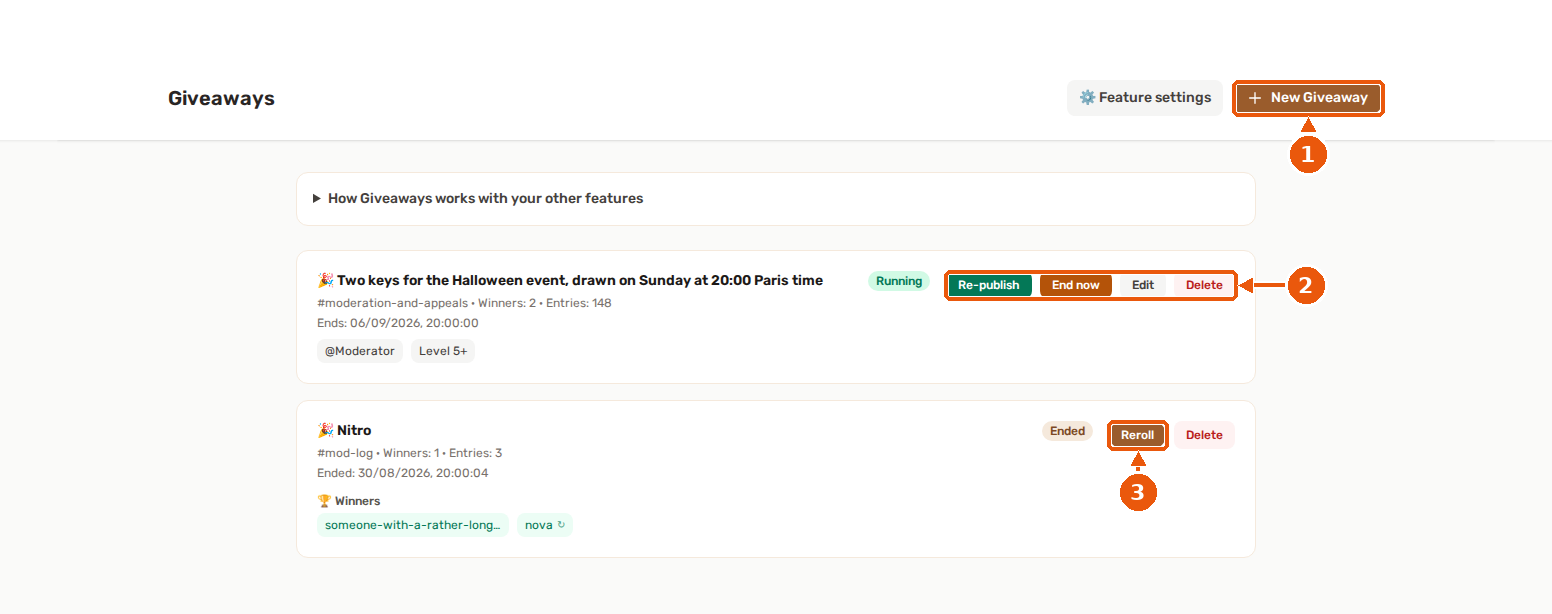
- New Giveaway starts the creation form: prize, channel, winners, end time.
- On a running giveaway: Re-publish posts the giveaway message again, End now closes it before its end time.
- Reroll on an ended giveaway draws again.
🎉 How it works
- Open the Giveaways page and create a giveaway.
- Set the prize, an optional description, and pick a Discord channel.
- Choose how many winners to draw and when the giveaway ends.
- Optionally add entry requirements (a role, or a minimum level).
- Save the giveaway, then click Publish on its card. YAWBDB posts an embed with a live countdown and an Enter button.
Members click Enter to join. When the timer runs out, the winners are drawn automatically, the embed is updated, and the winners are announced in the channel.
🎯 Entry requirements
A giveaway can be open to everyone, or gated:
- Required role — only members holding a specific role can enter.
- Required level: only members at or above a minimum level (1 to 1000) can enter. The field is locked (Requires Leveling) until the Leveling feature is enabled on the server.
Requirements are checked the moment a member clicks Enter. Invalid entries are rejected with a private, ephemeral message explaining exactly why — nobody else sees it.
🏆 How winners are drawn
Winners are drawn on the panel, not inside the bot. This keeps draws fair and reliable:
- The pick is random among all valid entrants. With bonus entries (see below), a member's chance grows with their number of entries.
- A giveaway always ends on time. If the bot restarts mid-giveaway, it catches up and draws the moment it reconnects.
- Fewer entrants than winners? Everyone who entered wins.
- No valid entrants? The giveaway ends cleanly and announces that no winner could be drawn.
🗂️ Managing giveaways
Each giveaway shows its status — Draft, Running, Ended, or Cancelled — along with its entry count and the winners once drawn.
- Publish / Re-publish — post the giveaway to Discord, or refresh the embed after an edit.
- End now — close a running giveaway early and draw the winners immediately.
- Reroll — draw a fresh winner, excluding everyone who already won, when a winner is unreachable. The original result stays on the giveaway message; the reroll is announced below it.
- Edit: change a giveaway that is still a draft or running. A running giveaway's embed is refreshed; if you change the channel, the old Discord message is deleted and you have to publish again. A finished giveaway can't be edited.
- Delete: remove a giveaway. If it was published, its Discord message is deleted too.
- DM winners: optionally send each winner a direct message (on by default). Toggle this in the feature settings.
You can run several giveaways per server at once, each in its own channel.
Limits: up to 50 winners per giveaway, up to 20 bonus rules (each worth 1 to 100 extra entries), and a minimum account age from 0 to 3650 days.
🎟️ Bonus entries
Give some members better odds with bonus entries. Each rule adds extra entries on top of the base 1, and the draw is weighted accordingly — a member with 3 entries is three times as likely to win.
Rule types:
- Has role — members with a chosen role get extra entries (great for Nitro boosters, supporters, etc.)
- Server booster — members boosting your server get extra entries
- Level ≥, Prestige ≥, Streak ≥, XP ≥ — reward your most active members
The level, prestige, streak and XP rules need the Leveling feature. When Leveling is off they appear locked in the editor with a notice — role and booster rules always work. Members see how many entries they have when they click Enter.
🎯 Eligibility filters
Optionally restrict who can win:
- Exclude sanctioned members — members with an active ban or mute can't enter (needs the Moderation feature)
- Minimum account age (in days): block brand-new accounts to deter alt-farming. Like the option above, it needs the Moderation feature and is locked (Requires Moderation) while that feature is off.
🔗 Works with your other features
- Leveling — bonus entries by level/prestige/streak/XP, a required-level condition, and reward-graph triggers (
On giveaway win,On giveaway entry) to grant XP or roles to participants. - Moderation — exclude sanctioned members from winning.
- Server Logs — when the Engagement category is enabled, giveaway start/end/winner events are logged.
Every bridge degrades gracefully: Giveaways works on its own, and feature-specific options are clearly locked when the other feature is off.
✅ Permissions
Giveaways only needs the baseline bot permissions (View Channels, Send Messages, Embed Links). It does not assign roles, so no Manage Roles permission is required. See Feature permissions.
👍 Recommended setup
- Create a giveaway, set a clear prize and a realistic end date.
- Pick the channel your community actually watches.
- Add a required role or level only if you want to limit who can enter.
- Publish, then check the embed shows the countdown and the Enter button.
- Let it run — winners are drawn and announced automatically.
💡 Best practices
- Keep the prize in the title short and clear; use the description for rules or details.
- Use a required level to reward active members and discourage throwaway accounts.
- If a winner never claims, use Reroll instead of recreating the giveaway.
- Enable DM winners so people know they won even if they miss the channel announcement.