Form Builder
Updated by Maxime_48 · 1 week ago · Views: 291
Build a form in the panel, and your members fill it in from a real Discord pop-up - up to ten questions, answers stored for review.
📝 How it works
- Enable Form Builder and open the Forms page.
- Create a form: give it a title, a command name, and your questions.
- Pick the channel where the answers should land, then tell your members to run
/form open.
A member picks the form, a pop-up opens with your questions, and the moment they submit it the answers arrive in your staff channel and in the panel, ready to accept or reject.
🧩 The ten-question limit
A form holds up to ten questions. Discord allows five components in a single pop-up and no more, so a form of six to ten questions opens in two pop-ups: the member fills in the first five, hits "Continue (2/2)", and the second pop-up opens with the rest. The panel enforces the count of ten in the editor so you never build a form Discord would refuse to display.
If you need more than ten answers, split the subject into two forms, or use a long-answer question and ask for several things inside it.
The first page is kept for 15 minutes while the member fills in the second. If sending the answers fails (a hiccup between the bot and the panel), the first page is not lost: the member can try again without retyping it. After 15 minutes without finishing, the form times out and /form open starts it over.
✍️ Question types
| Type | What the member sees |
|---|---|
| Short answer | A single-line text box. |
| Long answer | A multi-line text box, for real paragraphs. |
| Single choice | A drop-down where exactly one option can be picked. |
| Multiple choice | A drop-down where several options can be picked at once. |
Each question can be required or optional, carry a hint shown inside the box, and — on text questions — a maximum length. Required text questions can also carry a minimum length, which Discord enforces in the pop-up itself before the member can submit.
Choice questions take up to 25 options.
⌨️ Member commands
| Command | What it does |
|---|---|
/form open <name> |
Opens a form and fills it in. The name completes itself as they type. |
/form list |
Shows every form currently open on the server. |
Both replies are private — only the member who ran the command sees them. The only public thing is the recap posted in your staff channel.
Members never need to remember what you called a form: /form open suggests the ones they are allowed to fill in as soon as they start typing.
⚙️ Settings, per form
| Setting | What it does |
|---|---|
| Title | Shown at the top of the pop-up and on the recap. |
| Command name | What members type after /form open. Letters, numbers and dashes. |
| Description | A one-line summary shown in /form list. |
| Answers channel | Where each submission is posted for your staff. Optional — without it, answers still land in the panel. |
| Ping role | Mentioned alongside the recap so your team notices it. Optional. |
| Required role | Only members holding this role can open the form. Optional. |
| Cooldown | How long a member waits before submitting the same form again. |
| One submission per member | Locks a member to a single answer, for good. |
| Confirmation message | The private thank-you the member sees after submitting. |
| Form is open | Uncheck to close the form without deleting it or its answers. |
| Let them know by private message when I accept or reject | DMs the member the form's name and your decision the moment you accept or reject. Your staff note is never included. |
📥 Reviewing submissions
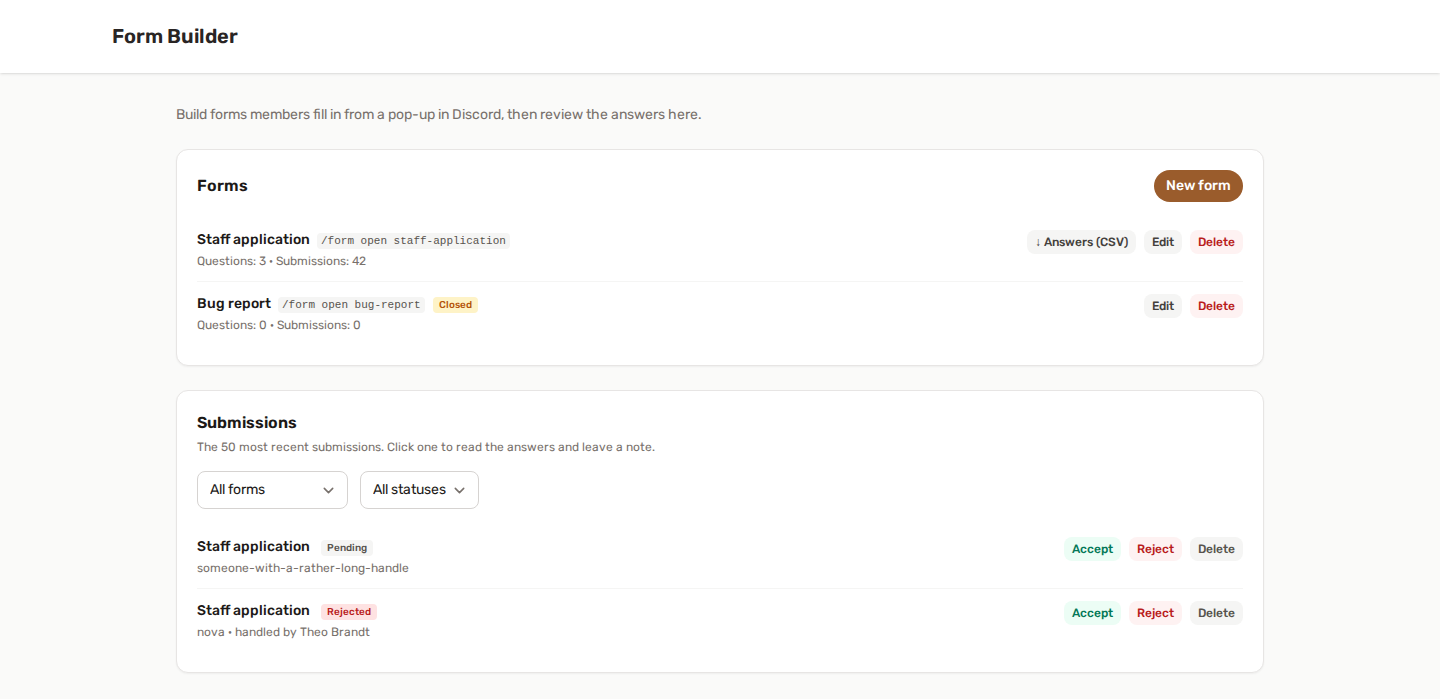
The Submissions section lists the 50 most recent answers, filterable by form and by status. Click one to unfold every answer.
From there you can:
- Accept or Reject it, which records who decided and when.
- Leave a staff note, saved alongside your decision.
- Jump straight to the recap the bot posted in Discord.
- Delete a submission outright.
Answers are frozen at the moment they are sent. Reword a question tomorrow and yesterday's submissions keep the wording they were actually answered under — you always read what the member really saw.
📣 Let them know
"Let them know by private message when I accept or reject", per form, tells the member by DM the moment you decide. The bot names the form and the decision; your staff note is never sent to them.
↓ Answers (CSV)
Every form that has answers gets a "↓ Answers (CSV)" button: one line per submission, one column per question.
- A question you rename later keeps its column - the export still lines up with the answers given before the rename.
- Two questions that ended up with the same label keep both their columns; nothing is merged or overwritten.
- The file opens with accents intact in Excel.
- An answer that starts like a spreadsheet formula (
=,+,-,@) is written out as text, so Excel never tries to run it.
Exporting a form's answers leaves a line in the server's audit log.
🛡️ Keeping it from being spammed
A form posts in a staff channel, so it is worth abusing. Several things stop that:
- The cooldown blocks a member from re-submitting immediately.
- One submission per member caps them at a single answer.
- A required role keeps the form out of reach of members who shouldn't see it.
- Closing the form stops new answers without touching the ones you already have.
All of these are checked again when the form comes back, not only when it was opened — so leaving a pop-up open in a corner and submitting it later does not slip past them.
If the same member sends a form twice at the same moment (two devices, say), the two sends are handled one after the other: on a form that allows a single answer, or has a cooldown, the second one is refused, so the answer is recorded once. On a two-page form, the last page sent twice by a double click does not send the answers twice either.
🔀 Form, suggestion, or ticket?
These three features look adjacent and deliberately do not overlap:
| Use | Feature |
|---|---|
| Structured answers to fixed questions, reviewed once | Form Builder |
| One free-text idea the community votes on | Suggestions |
| An ongoing private conversation with your staff | Discord Tickets |
A staff application, a partnership request or an event sign-up is a form. "I have a problem" is still a ticket.
🔗 Works with
- Leveling — the On form submitted trigger lets your reward graph react when someone sends a form: grant XP, hand out a role, send a DM.
- Server Logs — submissions are recorded under the engagement category when Server Logs is on.
✅ Permissions
The bot needs View Channel, Send Messages and Embed Links in the answers channel. Nothing more — the Form Builder never assigns roles or moderates anyone by itself.
If the answers channel is deleted or the bot loses access to it, submissions are still stored in the panel. You never lose an answer because a channel went missing.