Join Verification
Updated by Maxime_48 · 1 week ago · Views: 380
Join Verification gates your server behind a verification step: new members click a button — and optionally solve a quick captcha — before they receive a role that unlocks the rest of the server. Great against bots and raids.
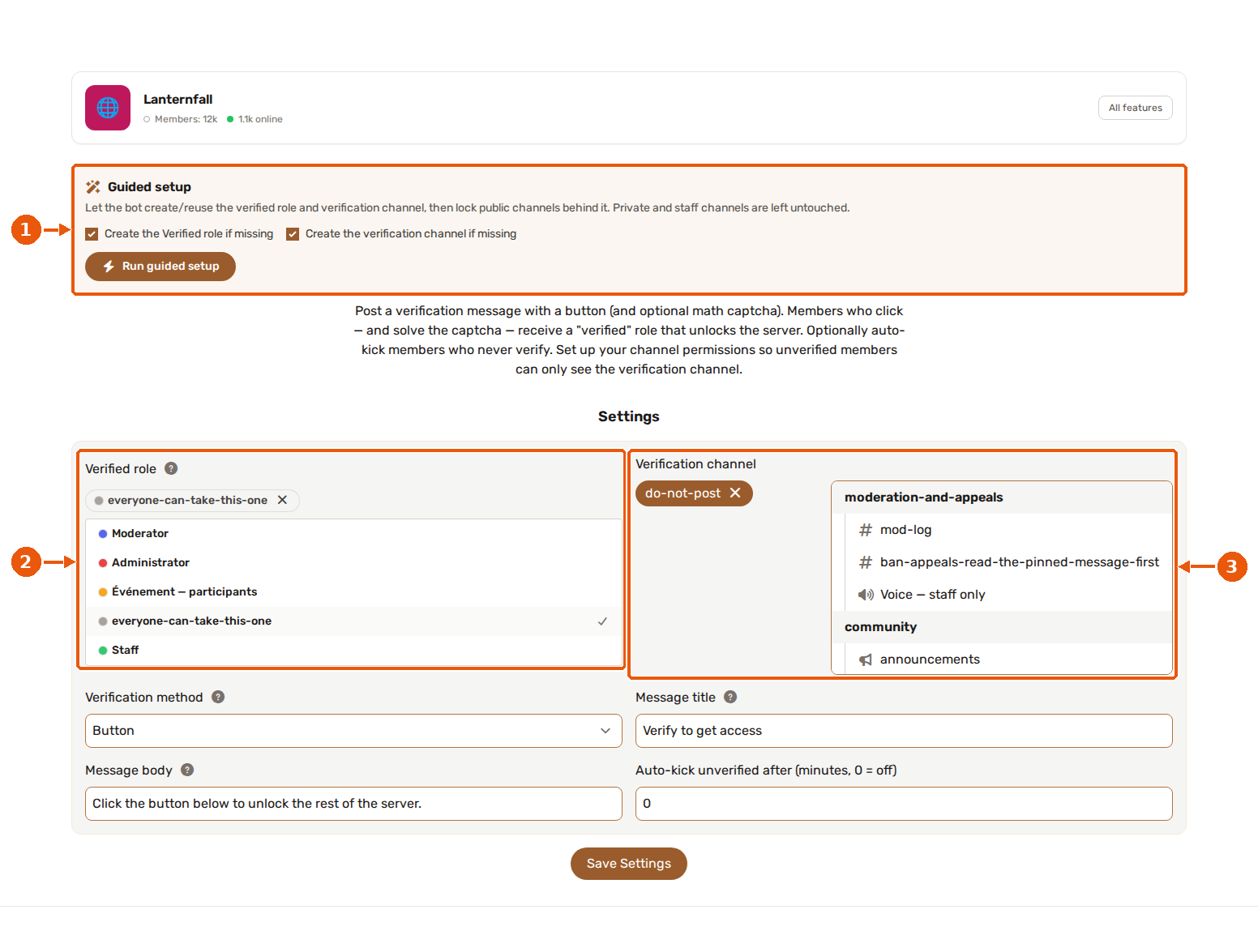
- Guided setup creates or reuses the verified role and the verification channel and locks public channels behind it.
- Verified role: granted to a member who passes verification.
- Verification channel: where the verification message with its button is posted.
✅ How it works
- Create a verified role and set up your channel permissions so unverified members can only see the verification channel.
- Enable Join Verification and configure the verified role, the verification channel, and the method.
- The bot posts a verification message with a Verify button in that channel.
- A member clicks Verify (and solves the captcha if enabled) → the bot grants the verified role.
The verification message is kept in sync automatically — edit the title/body in the settings and it updates itself.
🪄 Guided setup
Instead of building the gate by hand, click Run guided setup in the Guided setup box of the Join Verification settings page (the feature must be enabled). You can tick whether to create the Verified role and the verification channel when they are missing; ones you already selected are reused. The bot needs Manage Roles and Manage Channels for this.
The bot then:
- Creates a Verified role and a verify channel when needed.
- Hides every public channel (every channel
@everyonecan currently see) from everyone except Verified members. - Keeps the verification channel visible and read-only for unverified members, and hides it from verified ones.
- Leaves private and staff channels untouched, as well as the rules, community updates, safety alerts and widget channels.
- Posts the verification message.
A confirmation appears first because channel permissions change across the whole server. When it finishes, the panel tells you how many channels were gated, left untouched or could not be updated, and warns you if the bot's role sits below the Verified role.
🔐 Methods
- Button: one click verifies. Simple and fast.
- Captcha: after clicking, a pop-up asks the member to answer a short addition of two single-digit numbers (e.g. What is 3 + 7?). The question is valid for 5 minutes; after a wrong or expired answer, the member clicks Verify again to get a new one. Stops most bots.
Answers to the member are only visible to them.
⚙️ Options
| Option | What it does |
|---|---|
| Verified role | The role granted on success. The bot's role must sit above it. Required. |
| Verification channel | Where the verification message lives. Required. |
| Verification method | Button or captcha. |
| Message title / body | Customise the embed (defaults provided). |
| Auto-kick after (minutes) | Kick members who never verify within this delay. 0 disables it. |
The auto-kick delay goes up to 1440 minutes (24 hours). When it ends, the bot checks again: a member who verified in time, or who left, is spared, and nobody is kicked if the feature or the option has been switched off meanwhile. Bots are never kicked.
✅ Permissions
Join Verification needs Manage Roles (to assign the verified role) and the baseline Send Messages / Embed Links in the verification channel. If you enable auto-kick, it also needs Kick Members. See Feature permissions.
⚠️ The bot can only assign a role below its own highest role. If verification silently fails, drag the YAWBDB role above the verified role.
💡 Recommended setup
- Make a
Verifiedrole and a#verifychannel. - In Server Settings → channels, deny
@everyoneaccess to everything except#verify, and allowVerifiedto see the rest. - Enable Join Verification, pick the role and channel, choose button or captcha.
- Optionally set an auto-kick delay to clear out accounts that never verify.