Reward Graph
Updated by Maxime_48 · 1 week ago · Views: 306
The Reward Graph is a visual editor for building advanced Leveling rewards.
Instead of only assigning one role at one level, you can build reward chains using triggers, conditions, and actions.
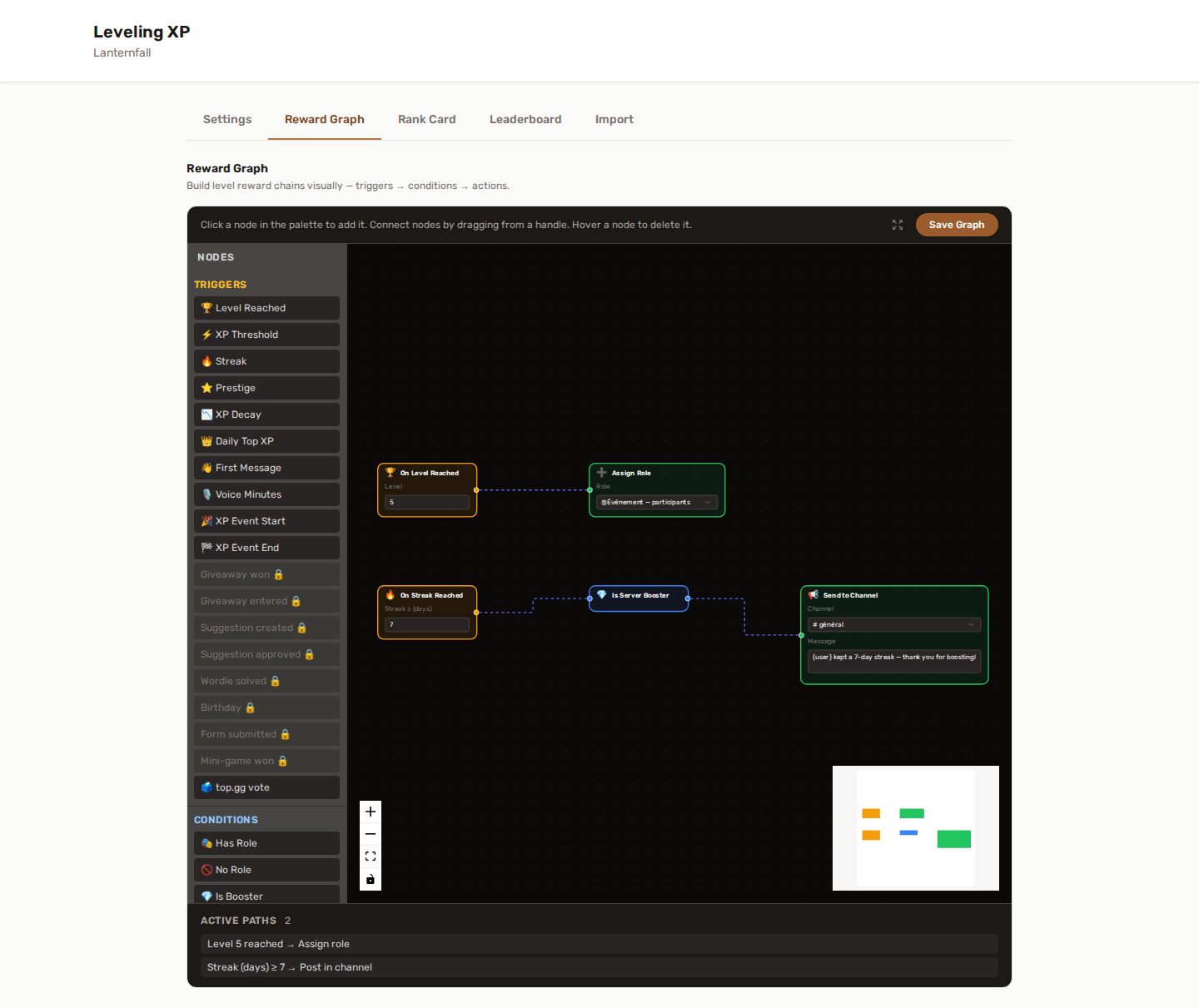
🧩 What is a Reward Graph?
A Reward Graph is a set of connected nodes.
Each chain usually follows this structure:
- Trigger — when should the reward chain run?
- Condition — who is allowed to receive the reward?
- Action — what should YAWBDB do?
Example:
When a member reaches level 10, if they do not already have the Booster role, assign the Active Member role and send a congratulations message.
⚡ Trigger nodes
Trigger nodes define when a chain starts.
Examples include:
- Level reached
- XP threshold reached
- Streak reached
- First message
- Voice minutes reached
- XP decay
- Prestige
- Daily Top XP
- XP Event start
Cross-feature triggers (shown locked in the palette until the matching feature is enabled):
- On giveaway win / On giveaway entry — require the Giveaways feature. Reward members with XP, roles or titles when they win or enter a giveaway.
- On suggestion created / On suggestion approved — require the Suggestions feature. Grant XP when a member submits a suggestion or gets one approved.
- Wordle solved — requires the Games feature with Wordle enabled. Fires when a member solves the daily Wordle, with two optional conditions right on the node: solved within N tries and Wordle streak ≥ N. Great for a "solved in 3" badge role or a streak reward.
- On birthday — requires the Birthdays feature. Fires once a year per member, right after their birthday announcement goes out. Pair it with Grant XP or XP multiplier for a birthday bonus, or hand out a one-off role.
- On form submitted — requires the Form Builder feature. Fires when a member sends any form. Grant XP for filling in an application, or hand out a "candidate" role automatically. Add a Cooldown node if a form has no cooldown of its own.
- Mini-game won — requires the Games feature. Fires when a member wins Hangman, Rock Paper Scissors or Trivia, carrying which game it was so a graph can branch on it. Note that each mini-game already has its own XP on win setting — use this trigger for anything richer than XP.
- Voted on top.gg - fires the next time the member earns XP on this server after voting for the bot on top.gg (a message, voice time, a reaction to their message), not at the moment of the vote itself - top.gg does not say which server a vote came from, so the graph waits for the member to actually show up here. Once per vote and per server; voting again re-arms it. Independent of the separate Top.gg Vote Boost XP multiplier. Reward it with a role, a message, or bonus XP.
These let you turn engagement (entering giveaways, posting suggestions) into XP. Add a Cooldown node to prevent farming.
❓ Condition nodes
Condition nodes decide whether the chain should continue.
Examples include:
- Member has a role
- Member does not have a role
- Level range
- XP range
- Minimum streak
- Is server booster
- Account age
- Server age
- Day of week
- Time window
- Prestige requirement
Conditions help you avoid giving rewards to the wrong members or triggering actions at the wrong time.
🎬 Action nodes
Action nodes define what happens when the chain succeeds.
Examples include:
- Assign role
- Remove role
- Swap role
- Send a direct message
- Send a message to a channel
- Grant XP
- Trigger prestige
- Set a personal multiplier
- Assign a title
- Pin a message
✏️ Variables you can put in a message
Any action that writes text — Send a direct message, Send a message to a channel — accepts these placeholders. They are replaced with the member's real values at the moment the message is sent.
| Variable | What it becomes |
|---|---|
{user} / {username} |
A mention of the member |
{level} |
Their level |
{xp} |
Their total XP |
{streak} |
Their current daily streak, in days |
{prestige} |
Their prestige rank (0 if they have never prestiged) |
{server} |
The server name |
{event} / {event_name} |
The name of the XP event, on the two XP-event triggers |
After a Trigger prestige action,
{prestige}in the messages that follow shows the rank the member has just reached, not the one they left.
A placeholder you spell wrong is printed as-is, so if a message shows {presige} to your members, check the spelling before anything else.
✨ Let the assistant build it
If describing what you want is easier than wiring it, the Graph Assistant proposes a graph from a sentence. It never applies anything on its own — you review the proposal and decide.
ℹ️ The (i) button on every card
Each card in the editor carries a small (i) in its top-right corner. It opens a panel that answers the three questions the card itself cannot show you.
What this card reads. The values it looks at — the member's level, their roles, how long they have been on the server, and so on. On a command graph some of these appear crossed out: a command does not carry them, so a card that depends on one can never fire there. The On XP threshold trigger is the clearest case, because it needs to know the XP the member had before the event, and a command has no "before".
What would make it do nothing. This is the part worth reading. Several cards are skipped in silence when a required field is left empty — an Assign role with no role chosen, a Send a message with an empty message. Nothing is logged, but the editor flags the card: it is outlined in amber with a note, and the list of paths marks its path Setting missing. The graph simply runs without that card. The panel names the exact field that would cause it.
Two conditions fail in the opposite direction, and the panel says so too: Has role with no role selected never passes, so everything after it is unreachable. Does not have role with no role selected always passes, so it filters nothing at all.
Which variables work here. On the cards that write text, the panel lists the placeholders that are valid on that card, so you never have to guess or come back to this page.
Cards do not pass values to one another. Everything a card reads comes from the event that started the graph, and reads the same in every card of that graph — the first one and the last one alike. That is why a card can use
{user}even when it is wired directly to the trigger, and why there is no way to have one card compute something for the next one to use.
The (i) button is part of the full editor, so it appears on desktop. The mobile summary stays a read-only overview.
🧠 Logic nodes
Advanced graphs can use logic nodes to control flow.
| Node | What it does |
|---|---|
| AND | Passes when every card wired into it passes |
| OR | Passes when at least one card wired into it passes |
| NOT | Passes when the card wired into it does not |
| Random | Follows exactly one of its outgoing paths, picked at random |
| Delay | Waits before continuing down the path |
| Cooldown | Blocks its path for a set number of hours after it runs |
| Sequence | Follows all its outgoing paths in order |
⚠️ AND, OR and NOT read backwards. They judge the cards wired into them, not the ones that come after. This is the one place in the editor where the arrows do not mean "then" — they mean "is one of the things being tested". Wire your conditions into the gate, and wire the gate out to the reward.
A gate with nothing wired into it has nothing to test: AND and NOT let everything through, OR blocks everything. Neither shows an error, so an accidentally disconnected condition turns into a reward that fires for everyone — or for no one.
These nodes help you build more complex reward systems while keeping everything visual.
📱 Mobile behavior
The visual editor is best used on desktop.
On smaller screens, the panel may provide a simplified or read-only view depending on the layout.
For major Reward Graph edits, use a desktop browser.
💡 Best practices
🌱 Start small
Create one simple reward first, then test it.
For example:
- Trigger: Level reached 5
- Action: Assign role Member+
Once that works, add conditions and extra actions.
🏷️ Use clear node names
Keep your graph readable. If you build many chains, use comments or labels where available.
📈 Avoid duplicate rewards
Use conditions such as “does not have role” to avoid repeatedly assigning the same reward.
⏱️ Use cooldowns carefully
Cooldowns are useful for preventing spam, but long cooldowns can make testing confusing.
📈 Test with a low-level reward first
Before building a complex level 50 reward chain, test the same structure at a low level.
💡 Example reward ideas
- Assign a role at level 10
- Remove the old role and assign a new one at level 25
- Send a DM when a member reaches a streak milestone
- Give a temporary XP multiplier to active event participants
- Announce when a Double XP event starts
- Give a special title after prestige
- Assign a daily champion role to the top XP earner
The Reward Graph is one of the most powerful parts of YAWBDB's Leveling system. It lets you design progression rules that match your community instead of forcing you into a fixed reward structure.