Anti-Raid
Updated by Maxime_48 · 1 week ago · Views: 329
Anti-Raid helps protect your Discord server from mass-join attacks and suspicious new accounts.
It works alongside Automod but focuses on members joining the server rather than messages already sent in chat.
🛡️ What Anti-Raid detects
Anti-Raid can detect join bursts.
A join burst happens when too many members join within a short time window.
For example:
If 10 members join within 10 seconds, trigger the raid response.
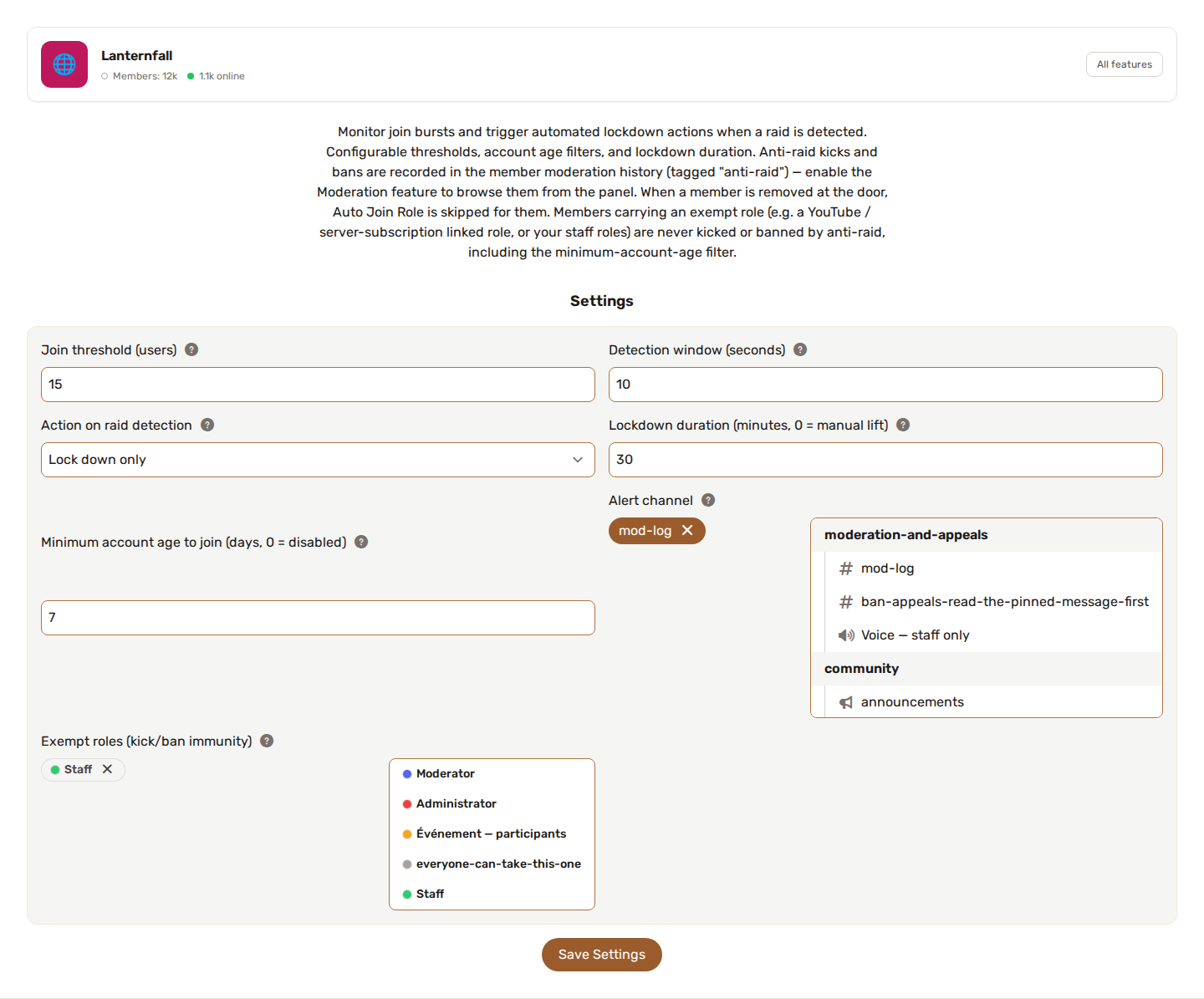
You can configure both the threshold (2 to 100 joins) and the time window (5 to 120 seconds).
🚨 Raid responses
When a raid is detected, YAWBDB can apply one of several responses.
👢 Kick
Kick recently joined members involved in the burst.
🔨 Ban
Ban recently joined members involved in the burst.
🔒 Lockdown only
Raise the server verification level (to the highest, Very High) without removing members.
This is useful when you want to slow down the raid but avoid automatically kicking or banning users.
🔒 Lockdown mode
During lockdown, YAWBDB raises the server verification level to Very High to make it harder for new or suspicious accounts to interact. With the Kick or Ban response, anyone who joins while the lockdown is active is removed too.
Set the lockdown duration in minutes (up to 1440, i.e. 24 hours): when it ends, the bot lifts the lockdown by itself, restores the previous verification level and posts an alert. With 0 the lockdown stays until staff lifts it by hand.
When a raid is detected, Kick and Ban apply to the members who joined during the detection window (at least the last 30 seconds).
⏳ Minimum account age filter
Anti-Raid can also enforce a minimum account age.
If a newly joined account is younger than the configured age (in days, up to 365, 0 = off), the bot kicks it and alerts staff. This filter is always on, even when no raid is happening.
This is useful against freshly created spam or raid accounts.
🎖️ Exempt roles
Pick one or more Exempt roles. A member who carries any of them is never removed by Anti-Raid: not by the raid response (kick or ban), and not by the minimum account age filter. Server owners and bots are always exempt too.
Add your staff roles here, and any role Discord applies the instant someone joins, such as a YouTube membership or server subscription role. Without it, a paying member with a brand-new account could be kicked by the account age filter.
An exempt member is not counted towards the join threshold, and Auto Join Role still runs for them.
⏱️ Account-age kick grace delay
Advanced option, 0 by default (kick immediately), up to 30 seconds. Leave it at 0 unless a role you trust is given by another bot a moment after the member joins. With a delay of a few seconds, Anti-Raid waits, checks the member again and spares them if the exempt role has landed in the meantime.
During the delay a genuinely too-new account stays in your server, so keep it as short as possible.
🚨 Alerts
You can configure an alert channel where YAWBDB posts raid or account-age events.
You can also configure a role to ping when alerts happen.
This helps staff react quickly during a raid.
🔗 Anti-Raid and Auto Join Role
Anti-Raid runs before Auto Join Role.
If a new member is kicked or banned by Anti-Raid, YAWBDB avoids trying to assign them an auto-join role afterward.
🔗 Anti-Raid and Appeals
Anti-Raid kicks and bans are recorded in the sanction history, tagged anti-raid (enable the Moderation feature to browse them from the panel).
Anti-Raid never sends a direct message to the accounts it removes: during a raid the response is mass and fast, and staff can review or undo it from the history.
👍 Recommended setup
For a small or medium server:
- Configure an alert channel.
- Set a conservative join threshold.
- Start with lockdown-only or kick before using ban.
- Set a reasonable minimum account age if your server is often targeted.
- Review alerts after real events and adjust thresholds.
💡 Best practices
- Avoid thresholds that are too low for large communities.
- Use lockdown-only if you are worried about false positives.
- Ping a staff role for important alerts.
- Review Anti-Raid sanctions after large events or public promotions.
- Remember that legitimate member spikes can happen after announcements, streams, or invites.