Server Insights
Updated by Maxime_48 · 1 week ago · Views: 348
Server Insights gives server owners and staff an analytics dashboard with tabs of data about their server — activity trends, leveling stats, moderation history, reports, member engagement, and games.
Go to Panel → your server → Insights to access it.
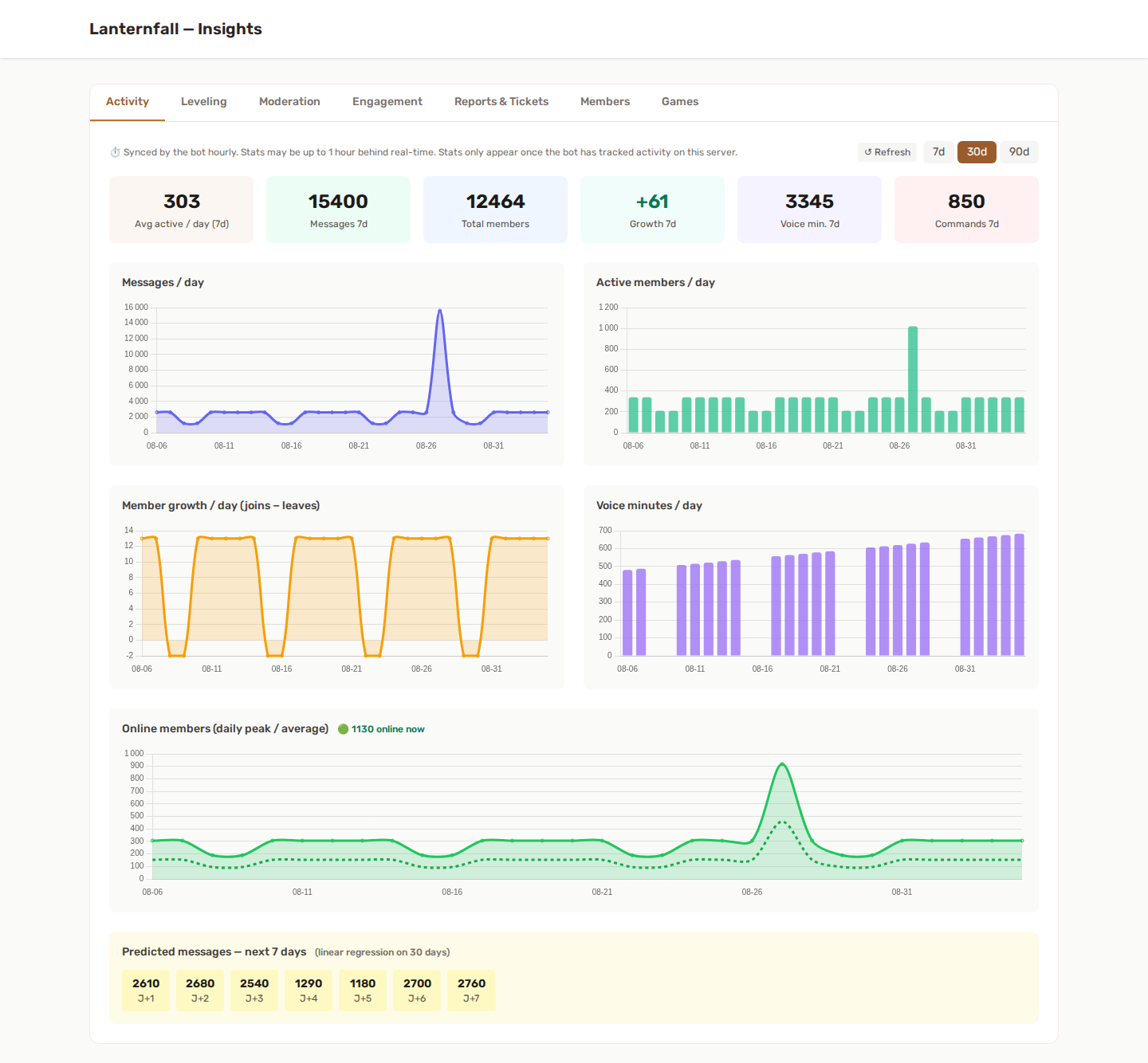
📈 Activity
Charts and KPIs built from daily snapshots collected by the bot.
Charts (filterable by 7d / 30d / 90d):
- Messages per day
- Active members per day (unique members who sent at least one message)
- Member growth per day (joins minus leaves)
- Voice minutes per day
- Online members (daily peak / average) - every hour the bot records how many of the server's members are not offline, charted as the daily peak and average over the selected range, with an "online now" badge. It is one total per server per hour: no one's status is kept
KPIs (last 7 days):
| KPI | What it measures |
|---|---|
| Avg active / day | Average number of unique members who sent a message each day |
| Messages | Total messages sent |
| Total members | Current member count at last sync |
| Growth | Net joins minus leaves |
| Voice min. | Total minutes spent in voice channels |
| Commands | Total bot slash commands used |
7-day prediction — a linear regression over the daily message counts of the selected period, shown as a day-by-day forecast for the next week. Only displayed when at least 7 data points are available.
⏱ Activity data is synced by the bot every hour. Today's stats may be up to 1 hour behind real-time.
⭐ Leveling
Summary KPIs:
| KPI | What it shows |
|---|---|
| Members ranked | Total members with at least 1 XP |
| Total XP earned | Sum of all XP across all members |
| Avg level | Average member level on the server |
| With custom title | Members who have unlocked a custom title |
| Prestige members | Members who have prestiged at least once |
Details:
- Top 20 leaderboard with username, level, XP and prestige counter
- Level distribution histogram by range (0–10 / 11–25 / 26–50 / 51–100 / 100+)
Updated in real time.
Requires the Leveling feature to be enabled on your server.
🔨 Moderation
- Sanctions broken down by type (warn, mute, kick, ban, softban, unban, unmute)
- Daily sanction count over the last 30 days
- Top 10 most-sanctioned members (all time)
Updated in real time.
Requires the Discord Moderation feature to be enabled.
🎉 Engagement
Two blocks, one for Giveaways and one for Suggestions:
- Giveaways: giveaways run, how many are running and how many have ended, total entries and winners drawn.
- Suggestions: total suggestions, the approval rate (approved or implemented out of all decided suggestions) and a count by status.
Updated in real time.
🚨 Reports & Tickets
- Reports: count by status, average resolution time
- Tickets: count by status, average close time
Updated in real time.
Requires Discord Reports and/or Discord Tickets to be enabled.
👥 Members
- Inactive members — members with no XP gain in the last 14 days and 30 days (useful when XP decay is enabled)
- Top contributors — top 10 members by total XP
Based on last XP gain per member. Updated in real time.
🎮 Games
This tab appears only when the Games feature is enabled for your server.
- Games overview — combined totals across every game you've switched on: games played, solve rate, unique players, and games played in the last 7 days.
- Per-game detail - for each enabled game, its own breakdown. For Wordle: solved vs. total, solve rate, average attempts on solved games, unique players, a games-per-day chart over 30 days, and the attempts distribution (1 to 6). For every mini-game (Hangman, Rock Paper Scissors, Trivia, 8-ball, Love calculator, Bingo): rounds played, win rate, unique players, rounds in the last 7 days, the won / lost / drawn split and a rounds-per-day chart.
Stats count games played from this server. A few plays are needed before charts fill in.
📊 /trends command
Use the /trends slash command directly in Discord to generate a 30-day chart as an image:
| Command | Chart |
|---|---|
/trends messages |
Messages per day |
/trends members |
Active members per day |
/trends activity |
Voice minutes per day |
Choose the metric with the required type option. The bot renders the chart (a filled line chart) as a PNG and posts it in the channel. A few days of activity are required before data is available.
🔑 Access
Insights is available to server owners and to team members whose role allows viewing the server, which includes all the default team roles.
It does not require any specific Discord permission — access is controlled entirely from the YAWBDB team settings.