Discord Tickets
Updated by Maxime_48 · 1 week ago · Views: 379
Discord Tickets let members open private support conversations with your staff directly from Discord.
Tickets are useful for support requests, billing questions, appeals, technical issues, or any topic that should not be handled in a public channel.
👤 Member command
Members can use:
/ticket subject category [details]
The category is picked from this list:
- Technical Issue
- Billing
- Appeal
- General
- Other
The subject holds up to 200 characters and the optional details up to 1000. Max tickets per user per day limits how many tickets a member can open per 24 hours, from 1 to 5, with 1 by default. Past the limit, the bot privately asks the member to wait.
🔒 Private ticket channel
When a ticket is opened, YAWBDB creates a private Discord channel, as soon as a Tickets category is set in the feature settings.
The channel is visible to:
- The ticket opener
- Configured staff roles
The ticket opener and staff can exchange messages in the channel.
🏷️ Ticket statuses
Tickets can move through statuses such as:
- Open
- In Progress
- Closed
Staff can mark a ticket as in progress or close it when the request has been handled.
🔒 Read-only after close
When a ticket is closed, the opener can no longer send messages in the channel but keeps read-only access to the history. The status buttons disappear from the ticket channel.
This preserves the conversation without letting closed tickets continue indefinitely.
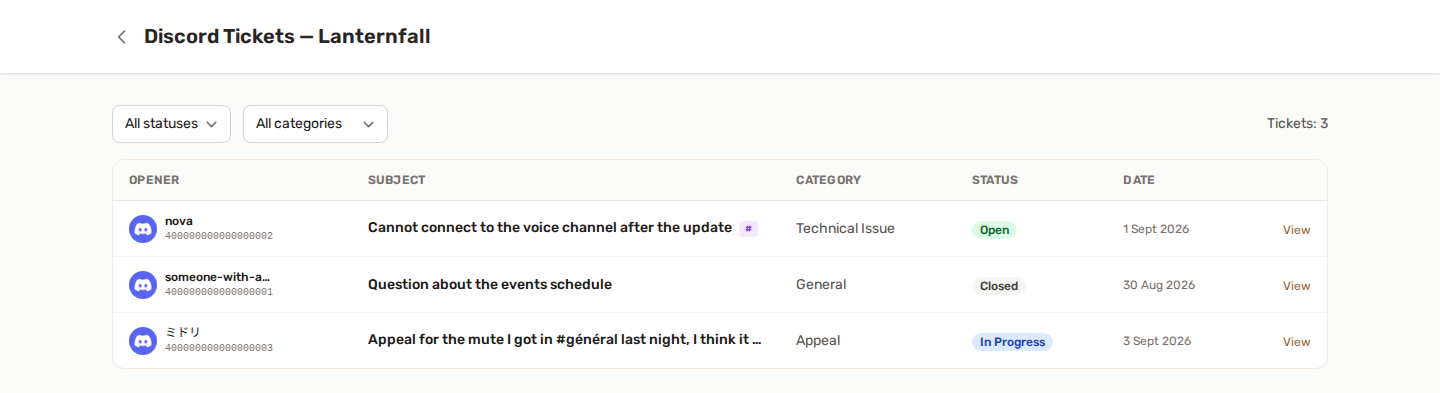
🎫 Panel tickets page
The Tickets page lets staff manage tickets from the panel.
Staff can:
- Browse tickets
- Filter by status or category
- View the full thread
- Reply from the panel
- Change status
- Add internal notes
- Export the thread as Markdown or HTML
- Delete a ticket and remove its Discord channel, if allowed
🔄 Bidirectional sync
Messages can sync between Discord and the panel.
Examples:
- A user sends a message in the Discord ticket channel; staff sees it in the panel.
- Staff replies from the panel; the message appears in Discord.
- Status changes update the pinned embed and the panel view.
📧 Email notifications
Depending on preferences, users may receive email notifications when staff replies to a ticket.
Staff may also receive email notifications when a new Discord ticket is opened.
👍 Recommended setup
- Enable Discord Tickets.
- Configure the tickets category.
- Select staff roles.
- Choose a role to ping, if needed.
- Set the max tickets per user per day.
- Open a test ticket.
💡 Best practices
- Keep ticket categories clear and simple.
- Use internal notes for staff-only context.
- Close tickets when resolved.
- Avoid using tickets for general public discussion.
- Export important ticket threads before deleting them.