Games
Updated by Maxime_48 · 1 week ago · Views: 326
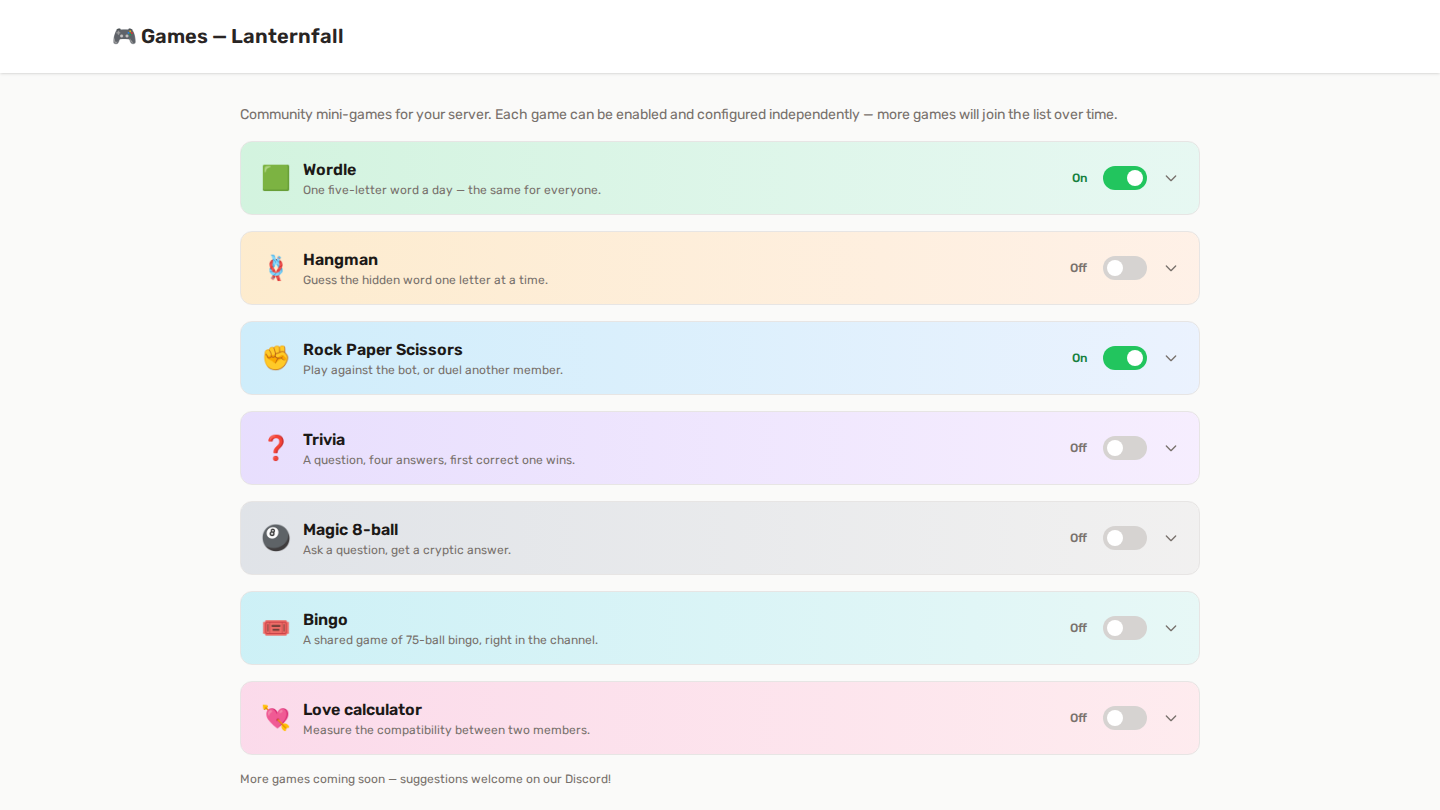
A growing hub of community games for your server. Each game is individually toggleable with its own settings, all from the dedicated Games page in your server panel.
Wordle is the headline game; a set of quick mini-games sits alongside it.
🎮 Enabling the hub
- In your server panel, open Features and enable Games.
- Open the Games page (dashboard shortcut or Features → Manage).
- Toggle the games you want and configure each one.
If the hub is disabled, game commands politely tell members it's off — settings are kept.
🟩 Wordle
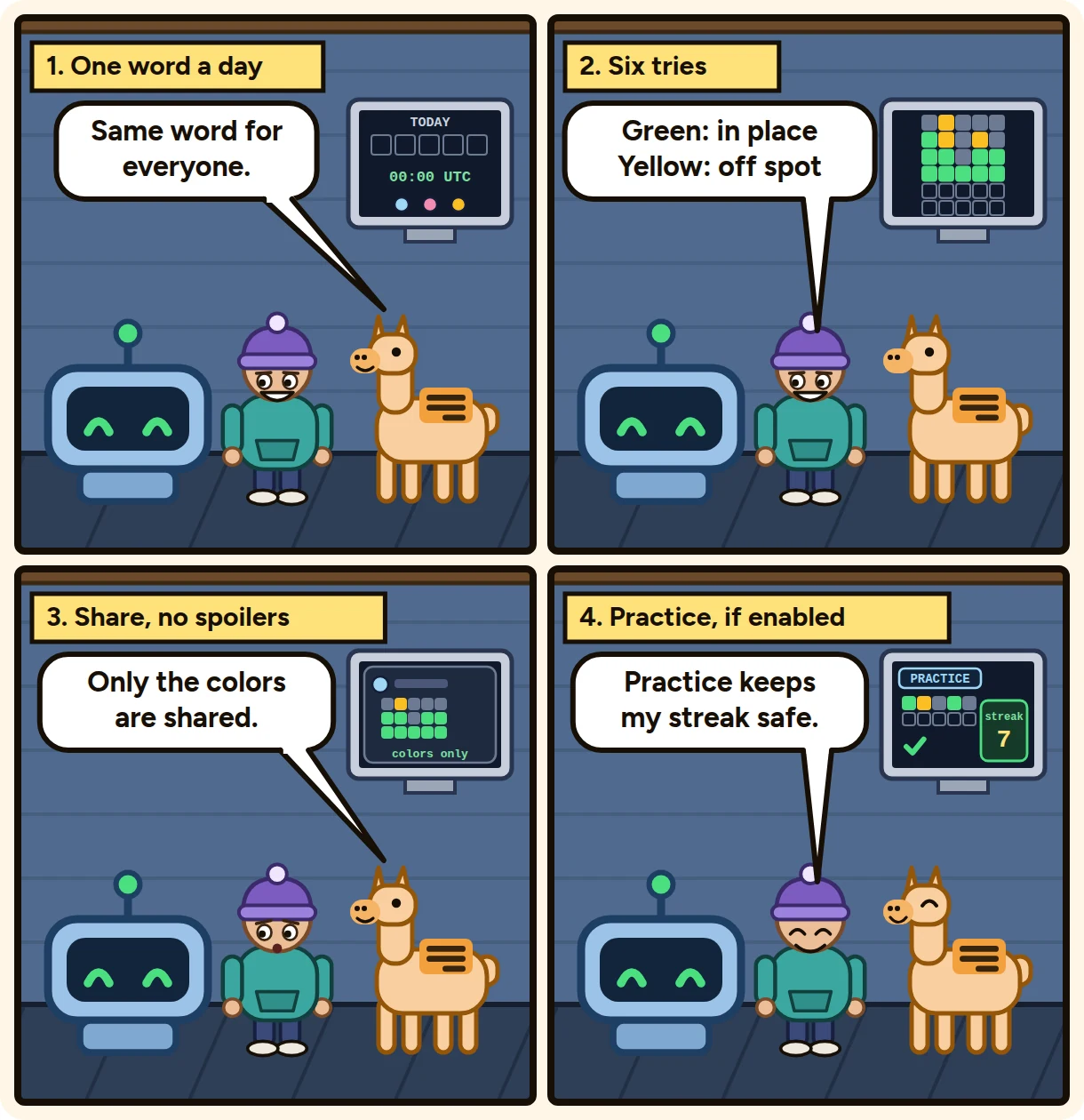
One five-letter word per day, the same for everyone playing in the same language, on every server, resetting at midnight UTC. The word comes in English or French (see Word language below). Six tries, classic colors:
- 🟩 letter in the right spot
- 🟨 letter in the word, wrong spot
- ⬛ letter not in the word
Playing
/wordle play— your private game (nobody sees your grid). Type guesses through the Guess button, letters you've used are summarized under the grid.- Play in window — where available, opens Wordle as an embedded Discord Activity: a full window with the grid and keyboard, right inside Discord.
- While you play, an optional live-progress embed fills up in the channel in real time — your spoiler-free color grid only, never your letters — just like the official Wordle.
- When you finish, hit Share result to post your spoiler-free emoji grid to the channel.
/wordle stats— games played, win rate, current & max streak, guess distribution./wordle leaderboard— the server's top solvers./wordle practice— practice games: a random word, as many games as you want. Off the record — no stats, streaks or XP — perfect for warming up without risking your streak. (Needs the Practice mode toggle below.)
Settings (Games page)
| Setting | What it does |
|---|---|
| Play mode | Per server — one game per member per day on this server (you can play again on another server). Shared — one global game per member per day, NYT-style, common to every shared-mode server. |
| Word language | Which language the daily word is in: Follow the server's language (default: a server whose Discord language is French gets the French word, everyone else gets English), English or French. Changing it starts a separate game: streaks and the leaderboard are kept per language. |
| Daily recap channel | The channel for the daily posts below. Leave off to disable them all. |
| Post the daily recap | Every day after the reset, posts yesterday's results: how many played, how many solved, and the fastest solvers. |
| Attach everyone's grids as an image | The recap includes a generated collage image — each player's colored grid and score side by side, like the official recap. Fastest solvers first (up to 25 grids shown). |
| Announce the new word at reset | When the word resets at midnight UTC, posts a short reminder that a new Wordle is available. |
| Ping in the reminder | Who gets mentioned in the reset reminder: nobody, yesterday's top 3 solvers, or everyone who played yesterday — handy so nobody breaks their streak. |
| Public live progress | Shows the live-progress embed while a member plays. On by default. |
| Practice mode | Lets members play unlimited practice games with /wordle practice — random words that never touch stats, streaks or XP. Off by default. |
| XP awarded on solve | Grants Leveling XP when a member finds the word — level-ups, reward graph and statroles all apply. Requires the Leveling feature; set 0 to disable. |
🌍 Wordle speaks the language of its word
Everything around the word follows the word's own language, not just the word itself: the game, its buttons, the guess window, /wordle stats, the leaderboard, the live-progress embed, the daily recap and the reset reminder. The language follows the game's own language setting where one is set, otherwise the server's Discord language.
/wordle's own command descriptions have a French version, shown to members whose Discord client is set to French.
Server Logs lines stay in English, as for every other feature - the log is read by staff, not by players.
Good to know
- Guesses are validated against a large dictionary of the word's language (about 21,000 five-letter words in English, a smaller list in French) — random letter mashes are rejected, but obscure-yet-real words are accepted.
- The answer never leaves the server until your game is over, so there is nothing to "inspect".
- Streaks follow the NYT rule: losing today's game resets your streak; not playing keeps yesterday's alive until the day ends.
- The Leveling reward graph has a Wordle solved trigger — react to solves with conditions on the number of tries and the streak (e.g. give a role for solving in 3 tries or less, or DM at a 7-day streak). See /wiki/core-features/leveling-xp/reward-graph.
🕹️ The mini-games
Six quick games sit alongside Wordle. They share the same shape: enable each one separately, restrict it to certain channels if you want, give it a cooldown, and optionally reward the winner with XP.
| Game | Command | What happens |
|---|---|---|
| 🪢 Hangman | /hangman |
The bot picks a word and shows its category. You guess letters from a drop-down; every wrong letter draws one more line. |
| ✊ Rock Paper Scissors | /rps |
One round against the bot, resolved instantly — or a duel: the member you challenge gets buttons, and the result counts for both of you. A member can keep at most 3 challenges waiting at once. |
| ❓ Trivia | /trivia |
A question with four buttons. Everyone can try, but each member gets one attempt, and the first correct answer wins. More than 1,000 questions in 18 categories: add the category option to pick one. Your server sees every question once before any comes back. |
| 🎱 Magic 8-ball | /8ball |
Ask a question, get a cryptic answer. No winner — just fun. |
| 💘 Love calculator | /love |
Compatibility between two members, as a percentage. No winner. |
| 🎰 Bingo | /bingo start |
A shared 75-ball game. Members join with a button and get a private card; the bot calls numbers on a timer until someone completes a line. |
🔮 Love calculator: push it further
The plain /love answer stays as it always was: a percentage and a verdict. Under it, a Push it further button opens the full reading. You can also skip the button and ask for it straight away with the details option of the command.
The full reading adds:
- Five sub-scores: Laughs, Teamwork, Adventure, Cosiness and Banter, which average back to the headline percentage.
- A forecast for the pair.
- An ideal outing idea.
- What the pair is best at, and its room to grow.
The same pair always gets the same reading, whoever is named first and whenever it is asked, so there is nothing to re-roll. It is just for fun.
With the text command, add one word after the members: details, detail, more, plus or full.
⚙️ Mini-game settings
| Setting | What it does |
|---|---|
| Allowed channels | Empty means the game works anywhere. Pick channels to confine it — useful to keep a bot-spam channel busy and the rest quiet. |
| Cooldown | How long a member waits between two rounds of that game. 0 removes the wait. |
| XP on win | XP granted to the winner, through the normal Leveling pipeline (level-ups, statroles and reward graph all fire). Needs the Leveling feature. |
| Wrong guesses allowed (Hangman) | How many wrong letters before the game is lost, from 3 to 10. |
| Time to answer (Trivia) | How long the question stays open before the answer is revealed. |
| Allow duels (Rock Paper Scissors) | When off, the game is played against the bot only. |
| Join window (Bingo) | How long members can join before the first number is called. |
| Seconds between calls (Bingo) | How often a new number is drawn. |
| Maximum players (Bingo) | How many cards can be dealt in one game. |
| What wins (Bingo) | The first completed line (row, column or diagonal), or a full card. |
| Engagement log | What this game sends to Server Logs: never, wins only, or every round. Set per game — see below. |
The 8-ball and the love calculator have no winner, so they are counted as plays but never produce a win rate. The love score is also stable for a given pair — asking again never changes it, which removes the point of re-rolling.
⏳ Games say when they end
A Rock Paper Scissors duel shows "Expires in 10 minutes" on the challenge; a hangman game shows an "Ends" field, a relative timestamp that keeps counting down as you look at it. When the time runs out, the board takes its buttons down - the duel says who did not play, hangman reveals the word. Nobody clicks on a game that has already died.
📝 Choosing what reaches the log
Each game decides on its own what it sends to the engagement category of Server Logs.
| Setting | What lands in the log |
|---|---|
| Never | Nothing at all from this game. |
| Wins only | One line per win — the default for the five games that have a winner. |
| Every round | Wins, losses, draws and rounds with no winner alike. |
Why this is per game rather than one switch for all of them: a /rps in a busy channel fires every few seconds, while a Wordle is once a day per member. Every round on Wordle is a readable daily digest; the same setting on rock-paper-scissors will bury the rest of your engagement log. Turning it on for one game and off for another is the whole point.
The 8-ball and the love calculator only offer never or every round, since they never produce a win — "wins only" would be a silent "never" for them.
A few things only every round shows you:
- Hangman losses, with the word that beat the member.
- RPS duels that end in a draw — one line naming both players and both moves, not one line each.
- Wordle games that ran out of tries, as a Wordle failed line.
- Bingos nobody won, whether the game was cancelled for lack of players or ran out of numbers.
Existing servers keep the behaviour they had: wins only on Wordle, Hangman, RPS, Trivia and Bingo, nothing on the 8-ball and the love calculator. Nothing changes until you open the setting.
The setting decides what a game offers the log — Server Logs still has to be enabled with its engagement category on for anything to be posted. The Games page warns you when it is not.
📊 What ends up in Insights
Every game feeds the Games tab of your server Insights:
- Rounds played, win rate, unique players and played in the last 7 days, per game.
- A 30-day curve of rounds per day.
- For Wordle specifically: solve rate, average attempts on solved games, and the attempts distribution.
A few things worth knowing about how those numbers are counted:
- A Wordle game only counts as played once it is finished. Someone still mid-guess is reported separately rather than counted as a loss, and these are the same numbers a member sees in
/wordle stats. - Draws and outcome-less games stay out of the win rate. A rock-paper-scissors draw is not a loss, and an 8-ball answer has no winner at all.
- Unique players counts people, not games — someone who plays three different games is counted once.
🎰 How Bingo works
/bingo start posts a board in the channel. Members click Join to get a private card - nobody sees anyone else's. The player count on the board moves as people join. When the join window closes (or when the host presses Start now), the bot calls a number every few seconds.
Your card moves by itself. The private card you got when joining is updated at every call: numbers that came up are marked [07] (green on clients that show colours), the latest call is highlighted, and the footer tells you how many numbers you are from a line. Discord lets a private message be edited for 15 minutes; after that, press My card to attach a fresh one. My card stays available for the whole game.
The board shows the latest call large (for example N-42) with every number called so far, one line per column, and a short message at the bottom of the channel announces each call.
By default the first member to complete a row, column or diagonal wins; the free centre square always counts as marked. In the Games page you can switch What wins to Full card, where every square must be called. If several cards complete on the same call, they share the win.
/bingo stop ends the game and leaves the board saying so. Only the member who started it, or someone with Manage Server, can stop it.
On the Games page, a Game in progress block shows the live board (called numbers, player count) and moves with every call.
The draw and the win check happen on the panel side, not in the bot. Restarting the bot mid-game loses nothing (cards already open stop moving; press My card to re-attach), and cards completing on the same number are settled in one pass.
A game nobody joins is cancelled instead of calling numbers into an empty room. A game that stops making progress for 15 minutes (the bot was away, the channel was deleted) is closed and its board says so; a game that keeps calling is never cut short.
🔗 Works with
- Leveling — the Mini-game won trigger fires whenever a member wins any mini-game, carrying which game it was. Grant XP, hand out a role, or DM them.
- XP on win goes through the full leveling pipeline, so level-up messages and statroles behave exactly as they would for a chat message.
- Statroles — the games won metric counts mini-game wins and Wordle solves together, and is checked the moment a member wins. Set a role at 50 wins and it lands with the win that earned it.
- Server Logs — games report to the engagement category, and each game chooses what it reports: never, wins only, or every round — see Choosing what reaches the log above.
- Server Insights — the Games tab, described above.
✅ Permissions
The bot needs View Channel, Send Messages and Embed Links wherever the games are played. No game moderates anyone by itself.
It also needs Manage Roles if — and only if — you use a games won statrole or a reward-graph action that hands out a role on a win. The bot's own role must sit above any role it grants.