Download your data
Updated by Maxime_48 · 1 week ago · Views: 350
You can ask YAWBDB for a copy of everything it holds about you, and get it without writing to anyone.
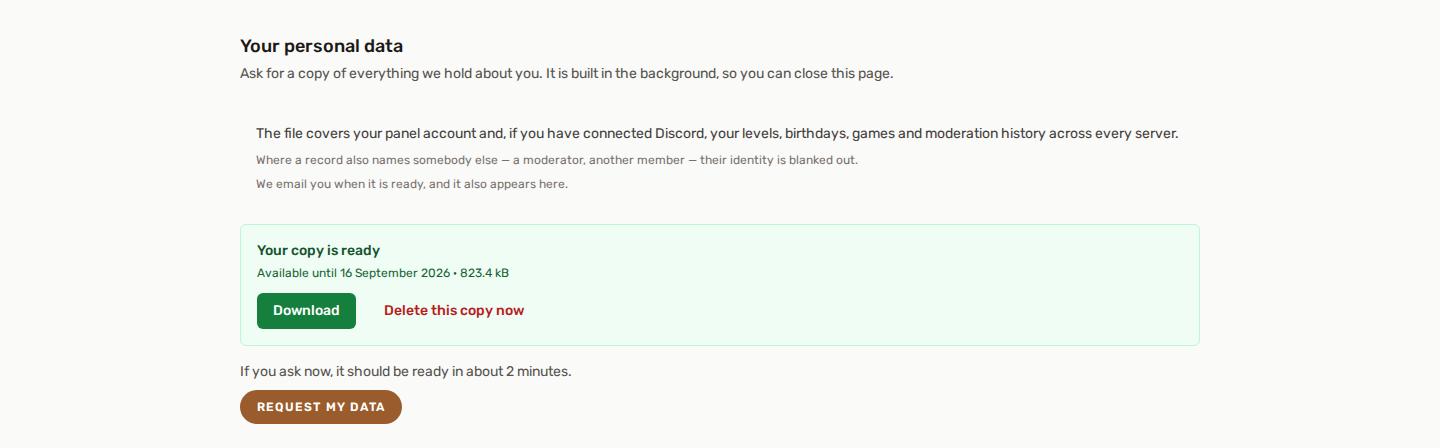
It lives in Profile → Your personal data. This is the GDPR right of access and the right to portability, self-served.
📦 What is in the file
The export is a single JSON file. It opens in any text editor, and it starts with a short section explaining what it contains and what was left out, written in the language your account is set to.
It covers both halves of your identity, which matters more than it sounds:
- Your panel account — profile, sessions, teams, chat messages, support tickets, invoices, media you uploaded.
- Your Discord member data — levels and XP on every server, birthday, games played, giveaway entries, suggestions and votes, moderation history.
The second half only appears if you have connected your Discord account. Until you do, the panel has no way to know which Discord member you are, so those rows cannot be recognised as yours. If your export looks thinner than expected, that is usually why: connect Discord from the same page and ask again.
Rows are grouped by the table they come from, and tables you have no data in are still listed as empty — so you can tell the difference between "nothing stored" and "not looked for".
🙈 What is blanked out, and why
Some records name two people. A sanction names you and the moderator who issued it. A report names the member who sent it and the member it is about.
In your copy, everyone who is not you is blanked out, and the record lists which fields were removed. You still see that the sanction exists, when it happened and why — you just do not get the moderator's name.
This is not us being cautious for its own sake: your right to your data does not extend to somebody else's. It works the same way in both directions, so the person who reported you cannot learn your name from their export either.
Credentials are never included — passwords, API tokens and session contents stay on the server.
The support team's internal notes on a ticket are not included either. They are the team's working notes for handling your request. Your ticket itself and every message you wrote are in the file, and the short section at the top of the file says what was left out.
⏳ Asking, and waiting
An export is as big as your history, so YAWBDB builds them one at a time. That keeps the site responsive when several people ask at once, and it means you may have to wait.
You are told what that costs before you commit:
- Before you ask, the page shows roughly how long it should take if you request now.
- Once you have asked, it shows your position in the queue and the time left, counting down on its own.
- You do not have to keep the page open. We email you when it is ready, and the file is waiting on the same page when you come back.
The estimate is measured from how long recent exports actually took, not a fixed guess, so it gets more accurate as it is used.
📥 Getting the file
When it is ready, a Download button appears in the same section.
- The file stays available for 7 days, then it is deleted from the servers. That is deliberate: a copy of your whole history sitting on a disk indefinitely is a risk with no upside.
- You can download it as many times as you like within those 7 days.
- After that, just ask again — there is nothing to recover, the file is simply rebuilt.
- Do not want to wait 7 days? Delete this copy now erases the file from our servers immediately. The delay before you can ask for a new one does not change - deleting early is not a way to reset the daily limit.
🔁 How often you can ask
You can request a new copy once a day.
The limit exists because each export is a heavy read, and repeated requests are the one thing that could turn this feature into a way to slow the site down for everybody. If you already have a file from today, it is still valid — nothing about your data changed enough in an hour to need a fresh one.
If an export fails, the limit does not apply: you can retry immediately, because nothing was delivered.
❓ If something goes wrong
- "The export did not go through" — nothing was sent and nothing was changed. Ask again; if it keeps happening, contact support.
- The wait is longer than the estimate — the estimate assumes exports ahead of you are of average size. Someone with a very long history can push it out. The countdown corrects itself as the queue moves.
- The email never arrived — check the address on your profile, and your spam folder. The file is on the profile page regardless; the email is a convenience, not the only way in.
🗑️ Deleting rather than downloading
Downloading a copy and deleting your account are separate things. If what you want is erasure, use Delete Account on the same profile page — and take the export first if you want to keep a copy, because deletion removes the account data for good. The Delete Account block itself points you to Get a copy of your data first, so you are reminded before you commit.