Outgoing Webhooks
Updated by Maxime_48 · 2 weeks ago · Views: 257
A webhook sends your team's activity to a URL you own, the moment it happens. Every action that lands in your Audit Log can be pushed as a signed JSON POST to your own server, your own bot, or an internal tool — no polling, no export, no scraping the panel.
One rule decides everything on this page. A webhook carries exactly what your team's Activity Log shows, and nothing more. Not a parallel feed with its own scope, not a richer payload for machines. If it is not on that page, it is not in the body.
📍 Where to find it
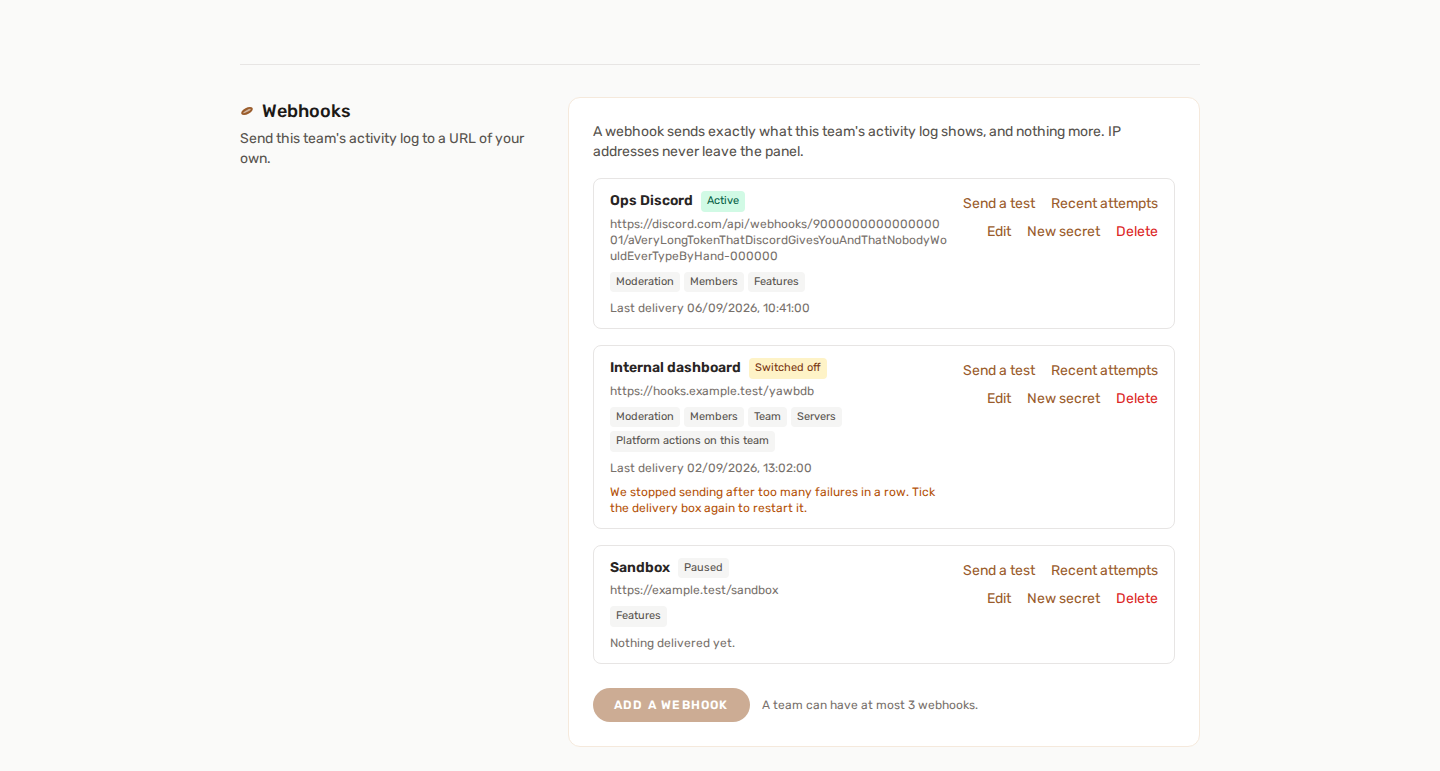
Team settings → Webhooks, under your team's own page. Up to three endpoints per team, each with its own URL, its own categories and its own signing secret.
Who may set one up: the team owner, or a member whose role includes Remove a server from the team. That is the same rule that opens the Activity Log itself — a webhook forwards what that page renders, so being allowed to read it is being allowed to forward it. See Team roles and permissions.
🎯 What gets sent, and what never does
You pick the categories. Only the ones you tick are delivered:
| Category | What it covers |
|---|---|
| Features | A feature enabled, disabled, or its settings saved |
| Servers | A server added to or removed from the team |
| Team | Team renamed, roles edited, webhooks changed |
| Members | Members invited, added, removed, or leaving |
| Moderation | Sanctions, appeals, reports, tickets, cleared histories |
| Subscription | Subscription changes on the team |
| Billing | Billing events on the team |
| Platform actions on this team | What a platform admin did to one of your servers |
🚫 Three things never travel
- IP addresses. On the Activity Log an IP is shown to the person it belongs to and to nobody else. A webhook has no reader to check against, so the field is not sent — it is removed from the payload, not blanked.
- Backoffice actions that are not about you. Platform-wide administration carries no team, so nothing in the fan-out can reach it. The Platform actions on this team category is only what an admin did to your servers.
- Credentials. Any field that looks like a token, a key or a secret arrives as
••••••••, on both sides of a before/after pair. This happens again on the way out, independently of the masking the page does.
Sign-ins are not offered. The audit trail has an auth category, and it is deliberately absent from the list above: pushing sign-in events to a third-party server, unattended and indefinitely, is a different act from showing them on a page somebody had to open. It may be added later.
📦 The delivery
Each delivery is a single POST with a JSON body:
{
  "version": 1,
  "delivery_id": "0a4b2f0e-8c6e-4a5f-9b3d-2f6c1e0d7a11",
  "event": "server.feature.enabled",
  "category": "feature",
  "team": { "id": 12, "name": "Night Shift" },
  "data": {
    "id": 918273,
    "action": "server.feature.enabled",
    "category": "feature",
    "description": "Enabled Starboard",
    "actor_name": "Ava",
    "actor_role": "moderator",
    "is_admin_action": false,
    "team_id": 12,
    "team_name": "Night Shift",
    "server_id": 4,
    "server_name": "Night Shift HQ",
    "subject_label": "Starboard",
    "changes": { "threshold": { "before": 3, "after": 5 } },
    "metadata": null,
    "created_at": "2026-09-06T09:41:12+00:00"
  }
}
Those fifteen fields are the whole of data — the same fifteen the Activity Log renders, minus the IP address. Any of them can be null: an action with no server carries "server_id": null, an action with nothing to diff carries "changes": null. Read them defensively rather than assuming a shape per event.
versionis the envelope version. It exists so your receiver can branch on it instead of guessing when the shape grows.eventis the audited action. There are over a hundred and thirty of them and the list grows with the platform — match on a prefix or oncategory, never on an exhaustive list of names.delivery_idis stable across every retry of the same event. It is what makes deduplication possible; see below.datais the audit entry itself, the same object the Activity Log renders.
📨 Headers
| Header | Value |
|---|---|
User-Agent |
YAWBDB-Webhooks/1.0 |
X-YAWBDB-Event |
The action name, same as event in the body |
X-YAWBDB-Delivery |
The delivery id, same as delivery_id |
X-YAWBDB-Timestamp |
Unix time in seconds, when the request was built |
X-YAWBDB-Signature |
v1= followed by the hex digest |
🔐 Verifying the signature
Anyone who learns your endpoint URL can POST anything to it. The signature is how you tell our deliveries from theirs.
The digest is HMAC-SHA256 over the timestamp, a dot, then the raw request body, keyed with your signing secret:
signed_string = X-YAWBDB-Timestamp + "." + raw_body
signature     = "v1=" + hex( hmac_sha256(signed_string, secret) )
Three details are load-bearing, and skipping any of them leaves a hole:
- Sign the raw bytes, before any JSON parsing. Re-serialising the body changes it — key order, escaped slashes, unicode — and the digest will not match.
- The timestamp is inside the signed string, not merely alongside it. That is what lets you reject replays: refuse a delivery whose timestamp is more than a few minutes old (five minutes is a sensible window) and an attacker cannot re-send a request they captured last week. Because the timestamp is signed, they cannot edit it either.
- Compare in constant time. A plain
==returns on the first differing byte, and that timing difference is enough to recover a signature one byte at a time. Usehash_equals,crypto.timingSafeEqual,hmac.compare_digest— whatever your language calls it.
PHP
$raw       = file_get_contents('php://input');
$timestamp = (int) ($_SERVER['HTTP_X_YAWBDB_TIMESTAMP'] ?? 0);
$given     = $_SERVER['HTTP_X_YAWBDB_SIGNATURE'] ?? '';

if (abs(time() - $timestamp) > 300) {
    http_response_code(400);   // too old, or clock is wrong
    exit;
}

$expected = 'v1=' . hash_hmac('sha256', $timestamp . '.' . $raw, $secret);

if (!hash_equals($expected, $given)) {
    http_response_code(401);
    exit;
}

http_response_code(200);       // accepted
Node.js (Express)
import crypto from 'node:crypto';

// The raw body is required — express.json() alone destroys it.
app.post('/yawbdb', express.raw({ type: 'application/json' }), (req, res) => {
  const timestamp = Number(req.get('X-YAWBDB-Timestamp'));
  const given     = req.get('X-YAWBDB-Signature') ?? '';

  if (Math.abs(Date.now() / 1000 - timestamp) > 300) return res.sendStatus(400);

  const expected = 'v1=' + crypto
    .createHmac('sha256', secret)
    .update(`${timestamp}.${req.body}`)
    .digest('hex');

  const a = Buffer.from(expected);
  const b = Buffer.from(given);

  if (a.length !== b.length || !crypto.timingSafeEqual(a, b)) return res.sendStatus(401);

  res.sendStatus(200);
});
The v1= prefix names the scheme. If it ever changes, a receiver that checks the prefix can refuse an unknown one deliberately instead of silently mis-reading it.
🔑 The secret
64 hexadecimal characters, generated for you, shown exactly once — in the panel, right after you create the endpoint or press New secret. Nothing reads it back afterwards: not the page, not the API, not an export. Lose it and you generate a new one.
Rotating takes effect immediately for everything sent from that moment. Deliveries already queued keep going out signed with the old secret until the queue drains, so expect a short overlap and update your receiver first.
🔁 Delivery, retries and deduplication
- Only a
2xxcounts as received. Anything else —3xx,4xx,5xx— is a failure. Answer fast and do the work afterwards. - Redirects are not followed. A
302is a failure, not a hop. Give us the final URL. - Timeouts are short: three seconds to connect, five seconds to answer. This is a notification, not a remote procedure call — acknowledge first, process later.
- Four attempts, spaced 30 seconds, 2 minutes, then 10 minutes: roughly twelve minutes end to end. That covers a deploy, not an outage.
- Retries reuse the same
delivery_id. A receiver that treats everyPOSTas new will double-count the day our first attempt succeeds on your side but times out on ours. Store the id and ignore one you have already handled. - Order is not guaranteed. Deliveries are queued independently; a retried one arrives after events that came later. Use
data.created_atif order matters to you.
⛔ Automatic switch-off
After 20 consecutive failures, the endpoint is switched off and the panel says so on the card. An endpoint that stopped answering usually stopped for good, and nobody comes to tell us — retrying for ever would cost a request and a history row per action, indefinitely.
To restart it: fix your receiver, then Edit the webhook and tick Deliver events to this endpoint again. Turning it back on is what clears the counter, so a repaired endpoint is not one failure away from going dark again.
🧪 Send a test
Send a test fires one real, signed request at your endpoint immediately and shows you the status code and the round-trip time. It is not a simulation: it goes through the same code every real delivery goes through, with the same headers, so an endpoint that passes the test cannot then reject production traffic over a header the test never sent.
The test body carries "event": "panel.webhook.test" and "category": "test", so your receiver can recognise it.
Expect two arrivals, not one. Pressing the button is itself an audited team action. So your endpoint gets the test delivery, and — if it subscribes to the Team category — a second, ordinary delivery for
team.webhook.testeda moment later. That is correct, and it is not a loop.
A test never counts towards the 20-failure ceiling, and never clears it. Debugging an endpoint cannot switch it off.
📜 Recent attempts
Recent attempts shows the last 20 tries for that endpoint: when, which event, which attempt number, the status code or the error, and how long it took. Failures carry a short excerpt of whatever your server answered — which is usually the fastest way to find out that a reverse proxy, not your code, is the one saying no.
Attempts are kept for 30 days and pruned nightly. This is debugging exhaust, not a record: the audit trail itself has its own, much longer retention.
🛡️ Where we refuse to send
An endpoint URL must point at the public internet. A URL that resolves to a loopback address, a private range, a link-local address or a cloud metadata address is refused — when you save it, and again before every single send.
The second check is the one that matters over time. A name that pointed somewhere public the day it was typed can point at 127.0.0.1 a month later, and a webhook fires for as long as it exists. A refusal counts as a failure for the endpoint and is not retried: asking the resolver the same question three more times would change nothing.
Prefer an https endpoint. The signature proves who sent the body, it does not hide it — over plain http, your activity travels in clear.
💬 Straight into a Discord or Slack channel
Paste a Discord webhook URL (https://discord.com/api/webhooks/…) as the endpoint and the panel sends a Discord message instead of the JSON envelope: one embed per entry, titled with the description, with the event, category, actor, team, server, subject and — when there are any — the changes as a short diff. The timestamp is the entry's, and the footer carries the delivery id.
The embed is built from the same envelope described above, so it inherits its two rules: no IP address, credentials masked. Mentions are switched off on Discord's side, so a channel or role named @everyone in an entry posts as text and pings nobody. The X-YAWBDB-* headers and the signature are still sent; Discord simply ignores them.
Discord answers 204 No Content to a message it accepted, which is what a green row in Recent attempts shows for it.
The same goes for a Slack incoming webhook URL (https://hooks.slack.com/services/…): the panel posts one Slack message per entry — the description in bold, then one line per fact, the changes in a code block, and the timestamp and delivery id underneath. It is built from the same envelope, so the same two rules hold, and the three characters Slack reserves for its own commands (<, >, &) are escaped, so a name typed by a member can never turn into @channel or @here. Slack answers 200 ok to a message it accepted. Slack's workflow and trigger URLs are not messages: they keep the JSON envelope, which a workflow can pick apart with its own variables.
💡 What people build with it
- Post your team's activity into a Discord or Slack channel of your own — a Discord or Slack webhook URL works as-is, or put your own receiver in between to filter and reformat.
- Mirror the trail into your own log store and keep it past the panel's retention window.
- Page someone when a moderation action lands out of hours.
- Trigger a build, a sync, or a backup when a feature setting changes.
🔗 See also
- Audit Log — what the trail records, and what it deliberately does not
- Team roles and permissions — who may open the page
- Server Logs — the Discord-side log, a different feature answering a different question