Activate a feature
Updated by Maxime_48 · 1 week ago · Views: 368
YAWBDB features are modular. You can enable only the features your Discord server needs.
Activating a feature makes it available for your server. Most features also need configuration before they start doing anything.
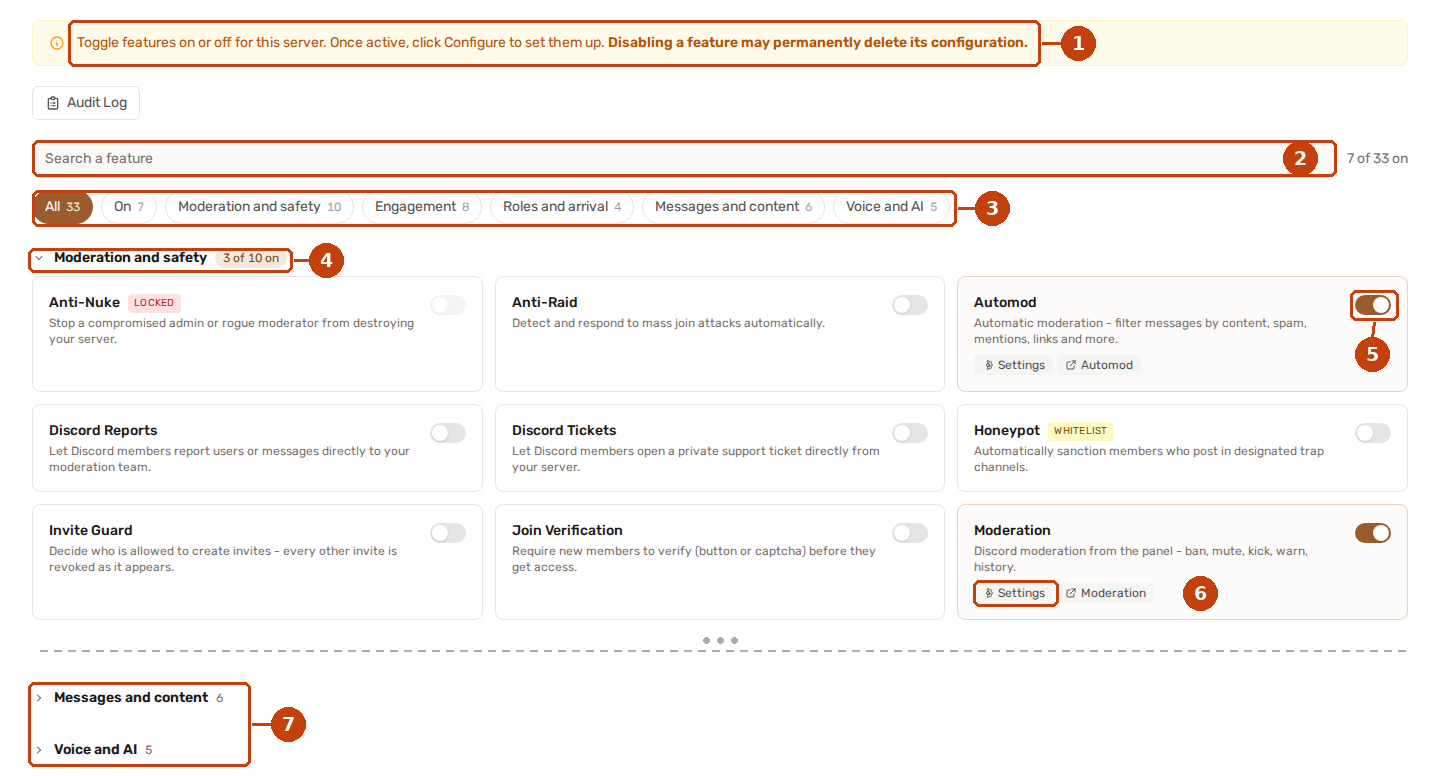
- Read this notice before switching a feature off: its configuration may be deleted.
- The search box reads the name and the summary under it, so "tickets" and "support" both land on Discord Tickets.
- One pill per theme, plus All and On. Every count is of the whole list, so it does not move while you type.
- A theme header says how many of its features are on. Click it to fold or unfold the theme.
- The switch turns a feature on or off for the server.
- The Settings link on an active feature opens its configuration page.
- Further down, a theme you have nothing switched on in starts folded. Click its header to see what it offers.
1️⃣ Step 1 — Open your server
From the dashboard, find the server you want to configure.
Click Features on the server card.
2️⃣ Step 2 — Find the feature you want
Your server has thirty-three features to choose from, grouped by theme:
- Moderation and safety - Moderation, Automod, Anti-Raid, Anti-Nuke, Invite Guard, Join Verification, Honeypot, Server Logs, Discord Reports, Discord Tickets
- Engagement - Leveling, Voting, Giveaways, Starboard, Suggestions, Birthdays, Games, Counters
- Roles and arrival - Rules Channel, Auto Join Role, Reaction Roles, Statroles
- Messages and content - Auto Responder, Custom Commands, Scheduled Messages, Social Alerts, Embed Builder, Form Builder
- Voice and AI - AI Response, AudioToText, Audio Recording, Voice Conversation, Temporary Voice
Three ways to get to one:
- Type in the search box - the name and the summary are both searched.
- Press a theme pill - only that theme is shown. On shows what is already running on your server, All brings everything back.
- Open a theme - a theme you have nothing switched on in starts folded, so the page opens on what you actually use. Click its header to see the rest.
Some features may be shown as locked or whitelisted if they are still limited to selected servers.
3️⃣ Step 3 — Enable the feature
Use the enable button or toggle for the feature you want.
Once enabled, the feature is connected to your server configuration.
This does not always mean the feature is fully ready. For example, Discord Tickets still needs a tickets category and staff roles, Automod needs rules, and Leveling needs XP settings.
4️⃣ Step 4 — Open the configuration page
After enabling the feature, open its configuration page.
Depending on the feature, this may be:
- A settings form
- A dedicated feature page
- A visual editor
- A drag-and-drop interface
- A mixed layout with both settings and visual configuration
5️⃣ Step 5 — Save your settings
After editing the settings, save the configuration.
The bot periodically reads the latest feature configuration from the panel, so changes should apply automatically.
When a save is refused
Settings are checked against what each field actually accepts before anything is stored. If something does not fit, nothing is saved at all and the reason appears right under the field concerned, with a red notice at the top of the page.
A few of the checks worth knowing about:
- A channel or role setting has to hold a real Discord id, which you get by picking from the list rather than typing.
- A numeric setting stays inside the range its description gives.
- A server lore link has to be a Pastebin link, such as
https://pastebin.com/AbCd1234— the bot only knows how to read those, so any other address used to be accepted and then quietly fetch nothing.
If the notice at the top mentions a setting you cannot see on the page, it belongs to a field that only appears once another setting is switched on.
🧩 Feature independence
YAWBDB features are designed to work independently.
For example:
- Automod can run even if Leveling is disabled.
- Leveling can run without Moderation.
- Discord Reports and Discord Tickets can be enabled separately.
- AI features can use default or custom model endpoints.
If two features interact, YAWBDB tries to degrade gracefully when the other feature is not enabled.
🌱 Recommended first features
For a new server, a good starting setup is:
- Moderation — for sanctions and logs
- Automod — for automatic rule enforcement
- Anti-Raid — for join-burst protection
- Discord Reports — so members can report issues
- Discord Tickets — for private support requests
- Leveling — to reward activity
You can start small and enable more features later.