Birthdays
Updated by Maxime_48 · 1 week ago · Views: 402
Members register their birthday once with /birthday set, and the bot wishes them a happy one on the day, in the channel you choose — with an optional temporary birthday role.
🎂 How it works
- Enable Birthdays and open the Birthdays page.
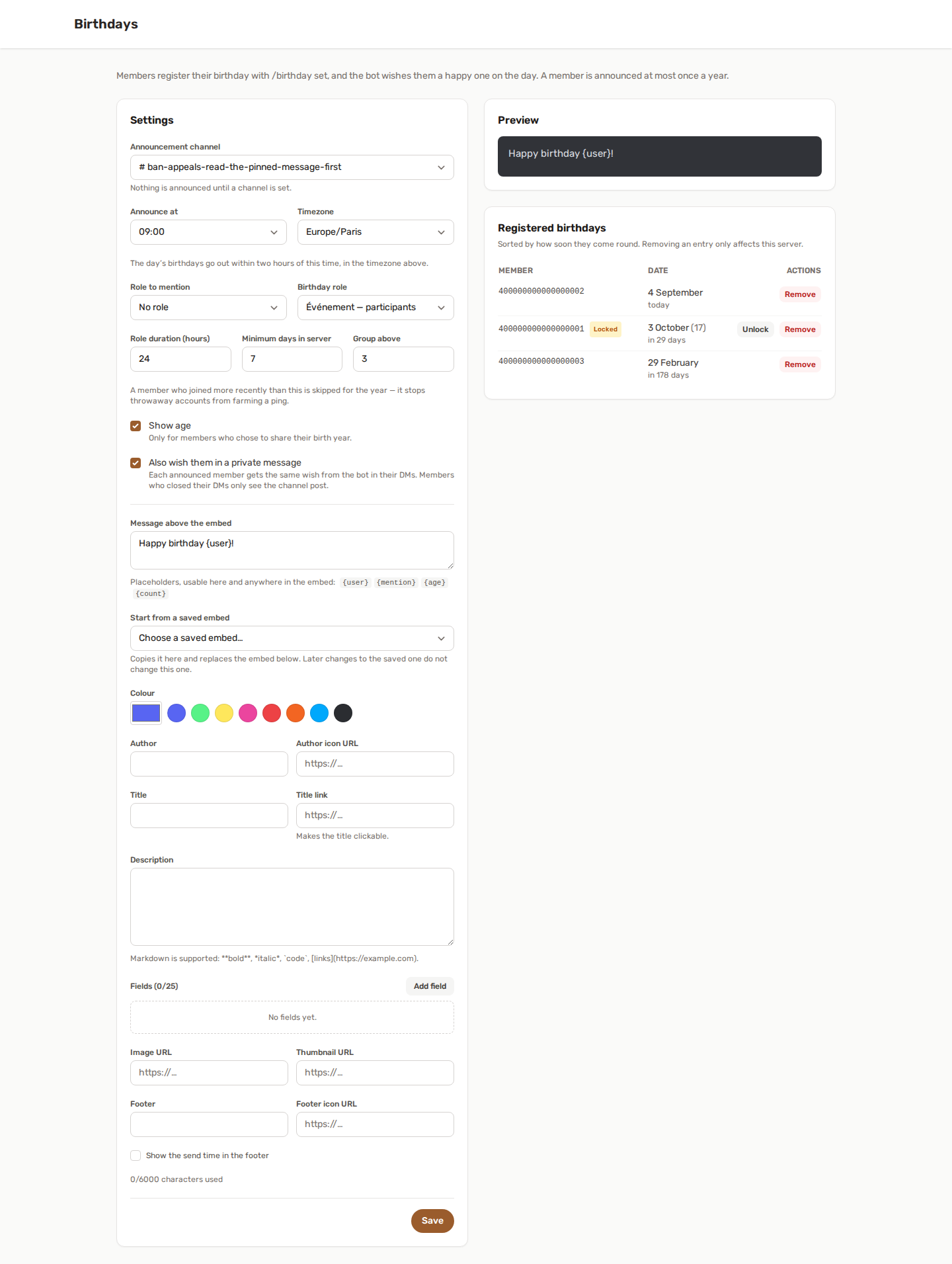
- Pick an announcement channel, an hour and a timezone. Nothing is announced until a channel is set.
- Compose the message. Tell your members to run
/birthday set.
On the day, the bot posts your announcement, hands out the birthday role if you configured one, and takes it back when the duration lapses.
🗓️ One birthday, every server
With a text prefix set, the same actions work from a normal message, for example !birthday set 14 July. See Text commands and the prefix.
A member's date is stored once for their Discord account, not once per server. Someone who already registered their birthday on another server running YAWBDB types nothing — running /birthday set here simply opts them in.
That means:
- No re-typing the same date in five different servers.
/birthday removeopts out of this server only. The date stays saved for the others./birthday forgetdeletes the record everywhere, on every server. This always works, even if a server has the feature switched off.
Nobody sees a member's birthday on a server they did not opt into.
⌨️ Member commands
| Command | What it does |
|---|---|
/birthday set |
Saves the date. Day, month, and an optional birth year. |
/birthday get |
Shows your birthday, or another member's if they opted in here. |
/birthday next |
Lists the upcoming birthdays on this server. |
/birthday remove |
Stops announcing your birthday on this server. |
/birthday forget |
Deletes your birthday from YAWBDB entirely. |
Every reply is private — only the person who ran the command sees it. The announcement on the day is the only thing that is ever public.
The birth year is optional and only ever used to show an age. A member who leaves it out simply never has an age shown.
💻 Setting it from the panel
A member can also set or remove their own birthday from their panel profile, without touching Discord at all - as long as their Discord account is linked to their panel account, since that link is how the panel knows which birthday is theirs.
The same rules as /birthday set apply: day, month and an optional year, and the same 30-day lock after a change. This is the account-wide date, not tied to any one server - exactly like the record /birthday set writes, it simply gives you a screen instead of a slash command. The Remove my birthday everywhere button erases the date from every server at once, like /birthday forget.
⚙️ Settings
| Setting | What it does |
|---|---|
| Announcement channel | Where the message is posted. Required. |
| Announce at / Timezone | The local hour the day's birthdays go out. The window stays open for two hours after that time. |
| Role to mention | Pinged alongside the announcement. Optional. |
| Birthday role | Handed out on the day and removed automatically. Optional. |
| Role duration | How many hours the birthday role is kept, from 1 to 168 (a week). |
| Minimum days in server | A member who joined more recently than this is skipped for the year. |
| Group above | Past this many birthdays on the same day, they go out as one message instead of several. |
| Show age | Displays the age — only for members who volunteered their birth year. |
| Also wish them in a private message | Sends the announced member the same message by DM, without the role ping. Members who closed their DMs simply see the channel post like everyone else. |
Why the two-hour window? The day's announcements only go out between your chosen hour and two hours later. Outside it, nothing is posted — so a member who sets their date to "today" in the evening waits for next year rather than triggering an instant ping.
✍️ Writing the announcement
The message is composed with the same editor as the Embed Builder: a plain text line above, a full embed below, live preview on the right. Pick Start from a saved embed to begin from one of your saved embeds: you get an independent copy, so editing the saved one later does not change this one.
These placeholders work in the text and anywhere in the embed — title, description, fields, footer:
| Placeholder | Becomes |
|---|---|
{mention} |
A mention of the member, or of all of them on a grouped message |
{user} |
The same as {mention} |
{age} |
The age they are turning. Blank on a grouped message, and blank if they didn't share a birth year or Show age is off |
{count} |
How many members are being celebrated |
If you leave both the message and the embed empty, the bot falls back to a plain "🎂 Happy birthday @member!" rather than posting nothing on someone's birthday.
Announcements never ping @everyone or @here.
🛡️ Nobody can farm the spotlight
Birthday announcements are a mention in a public channel, so they are worth abusing. Several things stop that:
- Once a year, per server. However many times a member rewrites their date, they are announced at most once per calendar year on a given server. Opting out and back in does not reset it.
- The command never announces anything. Only the scheduled check posts, so setting your date to today does not fire a message.
- Changes are rate-limited. The first save is free — people mistype. Changing the date after that locks it for 30 days.
- Minimum time in server. Set it so brand-new accounts can't join, claim today, and collect a ping.
- The two-hour window described above.
If a member genuinely mistyped their date and is now locked, staff can lift the lock from the Birthdays page.
🧑💼 The panel side
The Birthdays page lists everyone who opted in, ordered by how soon their birthday comes round, with a badge for members who are locked or already announced this year.
- Unlock — lifts the 30-day change cooldown for a member who made a genuine mistake.
- Remove — deletes that member's birthday from this server only. Their record on other servers is untouched.
🏆 Birthdays and Leveling
If Leveling is enabled, the Reward Graph gains an On birthday trigger. It fires once a year per member, right after their announcement goes out.
Chain it into any action: grant bonus XP, give a personal XP multiplier for the day, assign a role, send a DM. Like every cross-feature trigger, the node stays locked in the palette until Birthdays is enabled.
✅ Permissions
Birthdays needs the baseline bot permissions (View Channels, Send Messages, Embed Links) in the announcement channel, plus Manage Roles if you use a birthday role. See Feature permissions.
The bot's role must sit above the birthday role in Server Settings → Roles, otherwise Discord refuses to assign it.
To ping a role, either make that role mentionable or grant the bot Mention @everyone, @here, and All Roles.
💡 Best practices
- Pick an hour when your server is actually awake — a 03:00 announcement is a wasted one.
- Leave Minimum days in server at a week or more on public servers.
- Keep Show age off unless your community genuinely wants it; plenty of people share a date but not a year.
- Use the grouping threshold: on a large server, five separate pings in a row reads as spam, one message with five mentions reads as a celebration.
❓ Nothing was announced
- Is a channel set, and can the bot post and embed links there?
- Has the announce hour already passed for today? The window is only two hours wide.
- Was the member announced earlier this year already? Check the badge on the Birthdays page.
- Did they join more recently than Minimum days in server?
- Is the birthday actually registered on this server? A member can have a date saved elsewhere without having opted in here.