Automod
Updated by Maxime_48 · 1 week ago · Views: 607
Automod helps protect your Discord server by automatically scanning messages and applying rules.
You can configure Automod from the YAWBDB panel. Each rule has its own trigger, configuration, action, and enabled/disabled state.
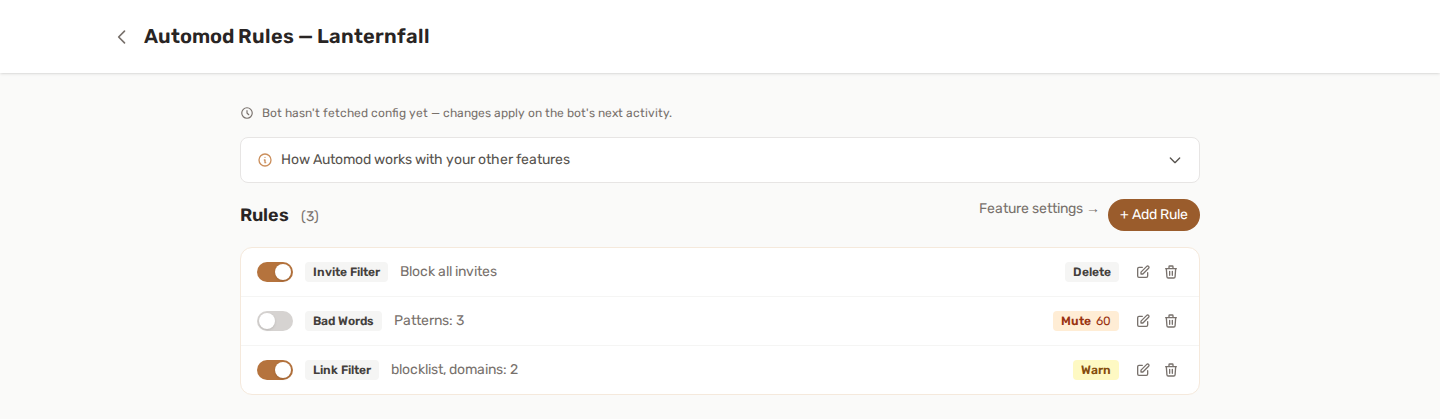
🔍 What Automod can detect
YAWBDB supports multiple rule types.
🤬 Bad words
Block specific words or regular expression patterns.
Write one pattern per line, as plain text or as /regex/. Matching ignores upper and lower case. A pattern longer than 200 characters, or built with a repetition inside another repetition such as (a+)+, is treated as unsafe and never matches anything.
Useful for:
- Slurs
- Offensive terms
- Known scam phrases
- Custom server-specific banned words
🌊 Spam messages
Detect when a user sends too many messages in a short time window.
Useful for reducing flood spam.
📣 Mass mentions
Detect messages with too many user or role mentions.
@everyone and @here are also counted.
🔗 Link filter
Block or allow links based on domains.
Modes include:
- Whitelist mode — only listed domains are allowed
- Blacklist mode — listed domains are blocked
✉️ Invite filter
Block Discord invite links.
Useful if you do not want members advertising other servers.
🔠 Caps spam
Detect messages with too many uppercase letters.
A minimum message length prevents very short messages from being flagged unfairly.
🆕 New account
Detect messages from accounts younger than a configured number of days.
This can help against suspicious new accounts.
🎣 Anti-Scam
Catch the classic Discord scams automatically: fake free Nitro and gift links, Steam giveaway bait, crypto/wallet-drainer messages and lookalike domains (dlscord, discord-gift, steamcommunity.ru and friends).
A curated built-in detection list is always active — no setup needed. Fake Nitro and Steam phrases are caught on their own; crypto and wallet-drainer phrases and lookalike domains are only flagged when the message also contains a link. You can extend it with your own patterns (plain text or regex, one per line) for scams specific to your community.
🗳️ Anti-Poll
Block native Discord polls. By default polls are removed everywhere; add channel IDs to the allow-list to keep polls possible in specific channels only.
🎬 Actions
Each rule applies one action. Every action except Warn also deletes the message that triggered the rule.
- Delete: removes the message and posts an entry in the log channel.
- Warn: records a warning and keeps the message.
- Mute: deletes the message and times the member out. Type the duration as a number of minutes or with a unit, for example
30,30m,2hor1d. - Kick and Ban: delete the message and remove the member from the server.
- Flag for review: only deletes the message and posts it in the log channel for staff. Nothing is recorded in the moderation history.
Warn, mute, kick and ban are recorded in the member's moderation history with Automod as the source, and the member receives a direct message with an appeal link for warns, mutes and bans. If several rules match the same message, all of their actions run.
🙈 Ignored roles and channels
You can configure roles and channels that Automod should ignore.
Examples:
- Ignore moderators
- Ignore staff-only channels
- Ignore bot command channels
- Ignore trusted roles
Use ignored roles carefully. Anyone with an ignored role can bypass Automod scanning.
📋 Logs
Automod can post an embed to a log channel every time it acts. Choose the channel in the Automod feature settings, or leave it empty to turn logging off.
Each entry shows:
- The member
- The rule type
- The reason, for example the word that was caught or the number of mentions
- The mute duration, for mutes
- The moderation case number, when one was recorded
- The time
Flagged messages are marked as flagged for staff review.
🔗 Automod and Leveling
Messages deleted by Automod never award XP, so rule-breaking cannot be farmed for levels.
A message that is only warned about is kept, and it still earns XP.
🔗 Automod and Moderation
Warn, mute, kick and ban actions are stored in the member's moderation history, tagged Automod. Enable the Moderation feature to browse that history from the panel.
Automod warnings also count toward the auto-warn threshold of Moderation: when a member reaches it, the automatic action set up in Moderation is triggered.
Delete and Flag for review are not recorded in the history.
👍 Recommended setup
For a new server:
- Configure the Automod log channel.
- Add ignored staff roles.
- Add one simple rule, such as invite filter or mass mentions.
- Test the rule with a controlled message.
- Add stricter rules gradually.
💡 Best practices
- Start with warning or delete actions before using kicks or bans.
- Use strict rules only when you are confident they will not create false positives.
- Keep a log channel so staff can audit automatic actions.
- Review Automod history regularly.
- Avoid overusing broad regex patterns unless you test them carefully.